


Login or Sign Up to become a member!
LessThanDot Sit Logo

LessThanDot

Data Management

Less Than Dot is a community of passionate IT professionals and enthusiasts dedicated to sharing technical knowledge, experience, and assistance. Inside you will find reference materials, interesting technical discussions, and expert tips and commentary. Once you register for an account you will have immediate access to the forums and all past articles and commentaries.

LTD Social Sitings

Lessthandot twitter Lessthandot Linkedin Lessthandot friendfeed Lessthandot facebook Lessthandot rss

Note: Watch for social icons on posts by your favorite authors to follow their postings on these and other social sites.

Your profile

    Search

    XML Feeds

    Google Ads

    « SQL Friday, The Best SQL Server Links Of The Past Week Episode 6Altering the Schema of a stored procedure in SQL-server 2005 »
    comments

    Not too many moons ago when I started out with SQL Server I was convinced that there was a memory leak inside SQL Server. I ran it locally and the RAM usage just keep growing and growing until my computer was so slow that I had to restart SQL Server. This fixed things for a while but after I ran some poorly written queries it would spike up again and stay high.

    There are question about this in forums/fora/newgroups all the time, people think that the sqlserver.exe process has a gigantic memory leak. This is just not true, the reason SQL Server will use as much memory as it can possible grab is that it is much more expensive to read from disk than from RAM. This is also the reason that you want as much RAM as you can afford to make SQL Server happy (and your customers). If your database is not gigantic it is possible that all your data could be in RAM.

    How do you know you need more RAM?
    Take a look at your Buffer Cache Hit Ratio, ideally you want to be at 95% plus.
    Mine right now is 99.927 which is very good. To look at the Buffer Cache Hit Ratio you need to open up Performance in Control Panel-->Administrative Tools. Click on the + to add a new counter, from the Performance object select SQL Server: Buffer Manager, from the Select counters from list select buffer cache hit ratio
    Take a look at the screen shot below if the text is too confusing
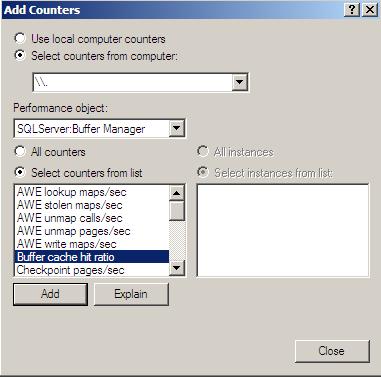

    Buffer Cache Hit Ratio


    So in the end there is no memory leak, because RAM is so much faster than disk SQL Server will use all it can grab. Solid State Disks might change that in the future but for now these Solid State Disks are not large enough

    If you are running SQL Server on your local machine make sure that you cap the memory it can use to something like 500MB or 25% less than the total memory on the machine. This will prevent it from slowing down your machine.

    *** If you have a SQL related question try our Microsoft SQL Server Programming forum or our Microsoft SQL Server Admin forum

    About the Author

    User bio imageDenis has been working with SQL Server since version 6.5. Although he worked as an ASP/JSP/ColdFusion developer before the dot com bust, he has been working exclusively as a database developer/architect since 2002. In addition to English, Denis is also fluent in Croatian and Dutch, but he can curse in many other languages and dialects (just ask the SQL optimizer) He lives in Princeton, NJ with his wife and three kids.

    Social SitingsTwitterFacebookLinkedInHomePageFlickrLTD RSS Feed
    11141 views
    Instapaper

    8 comments

    Comment from: Tim Ford [Visitor] · http://www.ford-it.com/sqlagentman
    ****-
    Tim Ford Well put and concise. It's amazing how many server techs blame SQL for issues. I end up having to explain this all the time.
    01/07/09 @ 08:04
    Comment from: Claude [Member]
    Claude I ain't no MSSQL techie, but always wondered why this happened. Thanks.
    01/07/09 @ 08:12
    Comment from: sqlsister [Member] Email
    *****
    sqlsister This is also why it is a bad idea to run your SQL Server and your Web Application on the same physical server.
    01/07/09 @ 09:20
    Comment from: Alex Ullrich [Member] Email
    Alex Ullrich I had someone ask about this just a few days ago, and having never actually looked at the task manager for SQL Server, I was thrown for a few minutes (server was running fine, figured if the network guys thought memory usage was a problem, it must be - big mistake!).

    Now your post has me wondering if SQL Server could be causing some issues running on my laptop. So I want to cap the memory there, which let me to this page on SQL Server memory options: http://msdn.microsoft.com/en-us/library/ms178067.aspx
    01/07/09 @ 09:38
    Comment from: SQLDenis [Member] Email
    *****
    SQLDenis Alex, yes I give SQL about 1 GB (out of 2)on one machine which I use for development. On the other one I give it 1.5 GB (out of 2) since it is primarly used as a SQL dev box by me and I almost never get onto the box itself
    01/07/09 @ 09:44
    Comment from: Naomi Nosonovsky [Member]
    Naomi Nosonovsky Can you explain the last phrase? How do you cap the memory it can use?
    08/30/10 @ 20:25
    Comment from: SQLDenis [Member] Email
    SQLDenis This will cap it to 1073741822 bytes (or 1 GB more or less)

    EXEC sys.sp_configure N'max server memory (MB)', N'1073741822 '
    GO
    RECONFIGURE WITH OVERRIDE
    GO
    08/31/10 @ 08:01
    Comment from: Jeremy [Visitor] · http://www.ultradata.com.au
    Jeremy Brilliant! Clear/concise explanation. Bottom line, if you're serious about your database server, then let it run on a box by itself and give it plenty of breathing space, i.e. RAM, CPU, and disk space, and watch it fly.
    06/07/11 @ 19:36

    Leave a comment


    Your email address will not be revealed on this site.

    Your URL will be displayed.
    (Line breaks become <br />)
    (Name, email & website)
    (Allow users to contact you through a message form (your email will not be revealed.)