


Login or Sign Up to become a member!
LessThanDot Sit Logo

LessThanDot

Web Developer

Less Than Dot is a community of passionate IT professionals and enthusiasts dedicated to sharing technical knowledge, experience, and assistance. Inside you will find reference materials, interesting technical discussions, and expert tips and commentary. Once you register for an account you will have immediate access to the forums and all past articles and commentaries.

LTD Social Sitings

Lessthandot twitter Lessthandot Linkedin Lessthandot friendfeed Lessthandot facebook Lessthandot rss

Note: Watch for social icons on posts by your favorite authors to follow their postings on these and other social sites.

Your profile

Search

XML Feeds

Google Ads

« ASP.NET MVC Release Candidate 2 Has Been ReleasedLearn Visual Studio 2010 now by watching these videos »
comments
Rate Post:
submit to reddit Digg!FacebookDotnetkicks

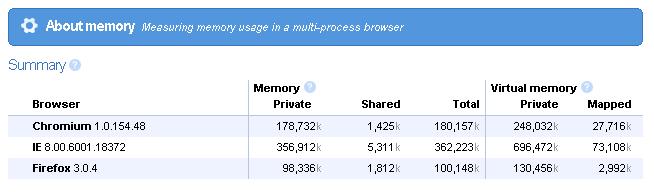
I decided to do a little test on one of my machines with the three browsers I use most. In each browser I opened up Gmail, Google Reader and CNNMoney.
I did this on Friday and did not look at the memory usage until Monday. After a little less than 3 days, we get the following numbers

Chromium 1.0.154.48
180,157k

IE 8.00.6001.18372
362,223k

Firefox 3.0.4
100,148k

Looking at these numbers makes you think that Google wrote Gmail and Google Reader in such a way that it on purpose made Internet Explorer leak memory like a bucket without a bottom.

  1. If IE
  2.    then leak memory
  3. else
  4.    behave normally

I don't know but this is just crazy, don't come to me either saying that IE8 is beta, so what, this is insane! IE8 uses 362MB while FireFox 3 only uses 100MB. Chrome compared to Firefox uses almost double the memory. Chrome + FireFox combine still use 80MB less than Internet Explorer 8

Below is a screen shot of what memory usage looks like
Browsers

About the Author

User bio imageDenis has been working with SQL Server since version 6.5. Although he worked as an ASP/JSP/ColdFusion developer before the dot com bust, he has been working exclusively as a database developer/architect since 2002. In addition to English, Denis is also fluent in Croatian and Dutch, but he can curse in many other languages and dialects (just ask the SQL optimizer) He lives in Princeton, NJ with his wife and three kids.

Social SitingsTwitterFacebookLinkedInHomePageLTD RSS Feed
4282 views
submit to reddit Digg!FacebookDotnetkicks

Comments and Feedback

4 comments

Comment from: cbetancourt [Member] Email
I wonder if IE7 is as leakalicious as its younger sibling.
03/02/09 @ 09:28
Comment from: SQLDenis [Member] Email
I wouldn't be surprised if IE7 was even worse
03/02/09 @ 13:46
Comment from: Piz [Visitor]
I was curious about this since I recently installed FF for the first time ever since IE came with a tabbed browser. My task manager shows FF with one page open using 48240K of memory and IE8 with the same page open using 47812K (that would be a combination of the page's process and the browser process). Am I reading this wrong?
10/24/09 @ 04:55
Comment from: HGN [Visitor] Email
Piz,
In order for the numbers to be meaningful, you generally have to add the part that is in virtual memory to the part that is in physical memory. If you don't use a program for a long time, it will tend to drift into much slower virtual memory; whereas if you use all its features a lot, it will stay in or drift toward faster physical memory. This is because in order for any code or data to be used, the part that is needed must be in physical memory. If you run out of physical memory, something that isn't being used as often gets pushed into virtual memory. This is important in a way, because the operating system decides what should be in physical memory and what part should be in virtual memory. If the OS is not moving idle parts of the program to virtual memory, according to reasonable logic, the program will appear to be hogging physical memory. Also, if you completely discard virtual memory, you're throwing out the fact that at some point everything in virtual memory must have been in physical memory, even if it wasn't there for long. Virtual memory hogs are not much better because they are physical memory hogs on computers with more physical memory, and require more page file space and memory swapping delays on older systems. Hence it is really the memory totals that should be considered. Ideally, the computer would never use virtual memory, but that would require a lot of physical RAM.

Some things that tend to kill IE8's performance are having more than one tab or IE window open, or putting your computer into hibernation and then waking it up. For some reason, the numbers always seem to look far worse after a hibernate.

I also notice that IE tends to have at least one more instance running in the task manager than I have windows open. Tabs don't appear to generate a new process though. Hence I don't know if it is really IE8 that is causing the problem, or if it is, perhaps, Flash Player or some other plugin using a separate IE instance to implement some type or ridiculous multithreading or multicore support that IE8 doesn't provide direct access to.

If what you're really concerned about is your computer going slow, you might want to look at your virus scanner. It usually uses mega memory, creates tons of page faults, and constantly bugs the OS for 1MB blocks of memory that it quickly discards. This tends to make for as bad or worse behavior performance wise than just taking up a lot of RAM with idle code or data, since idle information will get moved to virtual space and essentially become a file on the hard disk until needed. Yes, the page file can still become fragmented, but for the sake of argument, using huge amounts of memory is not bad as long as the idle information really is not being used.

I think a big problem is that most programming environments don't really give an obvious way to tell the Windows Loader to not load certain things until needed, nor to set up huge blocks of information such that the OS will attempt to move them out of memory first, before other things.

Also, memory is not used very efficiently anyway, since most programs use memory according to pages, meaning one byte being used could be killing access to 4,000+ bytes that aren't. Long story.

Anyway, reducing the amount of memory IE uses would probably be a good thing, but it may not be hurting your computer's performance as much as you think. Problems are likely due to supporting so many different revisions of so many different features, and the OS not handling memory as well as it could. When looking at numbers, consider physical and virtual memory together, because anything in virtual memory could randomly end up in physical memory at any time.
11/28/09 @ 15:45

Leave a comment


Your email address will not be revealed on this site.

Your URL will be displayed.
(Line breaks become <br />)
(Name, email & website)
(Allow users to contact you through a message form (your email will not be revealed.)