


Login or Sign Up to become a member!
LessThanDot Sit Logo

LessThanDot

Web Developer

Less Than Dot is a community of passionate IT professionals and enthusiasts dedicated to sharing technical knowledge, experience, and assistance. Inside you will find reference materials, interesting technical discussions, and expert tips and commentary. Once you register for an account you will have immediate access to the forums and all past articles and commentaries.

LTD Social Sitings

Lessthandot twitter Lessthandot Linkedin Lessthandot friendfeed Lessthandot facebook Lessthandot rss

Note: Watch for social icons on posts by your favorite authors to follow their postings on these and other social sites.

Your profile

    Search

    XML Feeds

    Google Ads

    « My Mobile-Friendly Site RedesignSquishIt Integration with Amazon S3 / Cloudfront »
    comments

    Introduction

    A long time ago (last week) I wrote about servicestack and easyhttp.

    now I would like to talk to you about restservice. Restservice is a way to make a restfull service with servicestack.

    The service

    First let's build our service.

    1. Imports ServiceStack.ServiceInterface
    2. Imports ServiceStackModel.Response
    3. Imports ServiceStackModel.Request
    4. Imports ServiceStack.ServiceHost
    5.  
    6. Public Class PlantService
    7.     Inherits RestServiceBase(Of PlantRequest)
    8.  
    9.     Private ReadOnly _plants As IList(Of PlantResponse)
    10.  
    11.     Public Sub New()
    12.         _plants = New List(Of PlantResponse)
    13.         _plants.Add(New PlantResponse() With {.Id = 1, .LatinName = "Fagus", .Name = "Beuk"})
    14.         _plants.Add(New PlantResponse() With {.Id = 2, .LatinName = "Betula", .Name = "Berk"})
    15.     End Sub
    16.  
    17.     Public Overrides Function OnGet(ByVal request As PlantRequest) As Object
    18.         If Not String.IsNullOrEmpty(request.Name) Then
    19.             Return _plants.Where(Function(response) response.Name = request.Name)
    20.         End If
    21.         Return _plants
    22.     End Function
    23.  
    24. End Class

    As you see I inherit from restservicebase and for now I just override the Onget method. The OnGet takes a plantrequest as a parameter.

    Since I still have the routes setup I can now use this url to get all the plants.

    http://localhost:3318/plant

    With this as the result.

    Or I can do this and get one result.

    http://localhost:3318/plant/Beuk
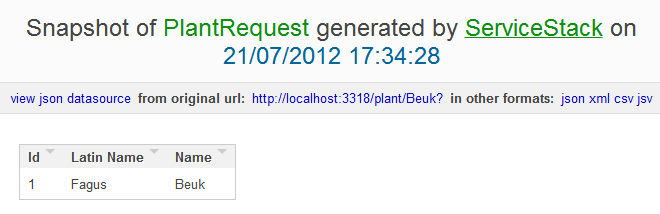
    The easyhttp client

    And now it was time to write the client.

    So there is 2 ways I could do this with easyhttp last week.

    1. Option Explicit Off
    2.  
    3. Imports EasyHttp.Http
    4.  
    5. Module Module1
    6.  
    7.     Sub Main()
    8.         Dim http = New HttpClient("http://localhost:3318")
    9.         http.Request.Accept = HttpContentTypes.ApplicationJson
    10.         Dim response = http.Get("/plant/Beuk")
    11.         Dim plant = response.DynamicBody
    12.         WritePlant(plant)
    13.         response = http.Get("/plant?Name=Berk")
    14.         plant = response.DynamicBody
    15.         WritePlant(plant)
    16.         Console.ReadLine()
    17.     End Sub
    18.  
    19.     Private Sub WritePlant(ByVal plant As Object)
    20.  
    21.         For Each plant In plant
    22.             Console.WriteLine(plant.Id)
    23.             Console.WriteLine(plant.Name)
    24.             Console.WriteLine(plant.LatinName)
    25.         Next
    26.     End Sub
    27. End Module
    28.  
    29. Public Class PlantRequest
    30.     Public Property Name As String
    31. End Class

    I can live with both ways. And it works. But I wanted a better way.

    I wanted this.

    1. Dim response = http.Get("/plant", new With {.Name="Beuk"})

    The above just makes the queryparameters and does the call that way.

    So this week there is a version of easyhttp namely (1.5.3) that supports the above. After all easyhttp is opensource and I just forked it, added a ton of code. Did a pull request, did another pull request and did a third pull request (Hadi is a hard man to please) and now we have the above code working. Simples ;-)

    Conclusion

    If an open source projects doesn't work the way you want than just fork it and add it.

    About the Author

    User bio imageChris is awesome.
    Social SitingsTwitterHomePageLTD RSS Feed
    InstapaperVote on HN

    3 comments

    Comment from: Demis Bellot [Visitor] · http://www.servicestack.net/mythz_blog/
    Demis Bellot Hi, Great article,

    Not sure if you're aware of the T.Dump() or T.PrintDump() extension methods in ServiceStack.Text?
    http://stackoverflow.com/a/3514115/85785

    It lets you do:

    Dim response = http.Get("/plant", new With {.Name="Beuk"})
    >> response.PrintDump()

    or its equivalent:
    >> Console.WriteLine(response.Dump())

    This saves me a lot of time debugging/introspecting objects and should save you from writing typed boilerplate dump methods like WritePlant().
    07/21/12 @ 12:28
    Comment from: Christiaan Baes (chrissie1) [Member]
    Christiaan Baes (chrissie1) Thanks.

    Nope I didn't know those mehtods existed. But I do now ;-).
    07/21/12 @ 12:44
    Comment from: Alex Ullrich [Member] Email
    Alex Ullrich ServiceStack rules - I guess MS' offerings are getting better with the WebAPI stuff but I still prefer the explicit overrides for OnGet, OnPut, etc... to the "Just give us a controller, we'll magically figure things out based on your method names" approach WebAPI seems to favor.
    07/22/12 @ 19:07

    Leave a comment


    Your email address will not be revealed on this site.

    To mislead the spambots.

    Your URL will be displayed.
    (Line breaks become <br />)
    (Name, email & website)
    (Allow users to contact you through a message form (your email will not be revealed.)
