



Introduction
Yesterday I started using Nancy, and I used the SuperSimpleViewEngine but I was told to use the razor view engine instead. And because I’m a good boy I did that.
Getting it to work
First thing to do is to install the Nancy.Viewengines.Razor package from nuget. This of course downloads the needed assemblies and adapts your webconfig.
And it makes a mistake when adapting the webconfig.
Your webconfig will look like this when it is done.
xml
<?xml version="1.0" encoding="utf-8"?>
<!--
  For more information on how to configure your ASP.NET application, please visit
  http://go.microsoft.com/fwlink/?LinkId=169433
  -->
<configuration>
  <system.web>
    <compilation debug="true" strict="false" explicit="true" targetFramework="4.5" />
    <httpRuntime targetFramework="4.5" />
    <httpHandlers>
      <add verb="*" type="Nancy.Hosting.Aspnet.NancyHttpRequestHandler" path="*" />
    </httpHandlers>
    <compilation debug="true" targetFramework="4.0">
      <buildProviders>
        <add extension=".cshtml" type="Nancy.ViewEngines.Razor.BuildProviders.NancyCSharpRazorBuildProvider, Nancy.ViewEngines.Razor.BuildProviders" />
        <add extension=".vbhtml" type="Nancy.ViewEngines.Razor.BuildProviders.NancyVisualBasicRazorBuildProvider, Nancy.ViewEngines.Razor.BuildProviders" />
      </buildProviders>
    </compilation>
  </system.web>
  <system.webServer>
    <validation validateIntegratedModeConfiguration="false" />
    <handlers>
      <add name="Nancy" verb="*" type="Nancy.Hosting.Aspnet.NancyHttpRequestHandler" path="*" />
    </handlers>
  </system.webServer>
  <appSettings>
    <add key="webPages:Enabled" value="false" />
  </appSettings>
</configuration>
The problem being that it adds this line <compilation debug=“true” targetFramework=“4.0”> while I already have this line <compilation debug=“true” strict=“false” explicit=“true” targetFramework=“4.5” /> and that seemed to be undesirable.
I fixed it by removing the first line and changing the second.
xml
<?xml version="1.0" encoding="utf-8"?>
<!--
  For more information on how to configure your ASP.NET application, please visit
  http://go.microsoft.com/fwlink/?LinkId=169433
  -->
<configuration>
  <system.web>
    <httpRuntime targetFramework="4.5" />
    <httpHandlers>
      <add verb="*" type="Nancy.Hosting.Aspnet.NancyHttpRequestHandler" path="*" />
    </httpHandlers>
    <compilation debug="true" strict="false" explicit="true" targetFramework="4.5">
      <buildProviders>
        <add extension=".cshtml" type="Nancy.ViewEngines.Razor.BuildProviders.NancyCSharpRazorBuildProvider, Nancy.ViewEngines.Razor.BuildProviders" />
        <add extension=".vbhtml" type="Nancy.ViewEngines.Razor.BuildProviders.NancyVisualBasicRazorBuildProvider, Nancy.ViewEngines.Razor.BuildProviders" />
      </buildProviders>
    </compilation>
  </system.web>
  <system.webServer>
    <validation validateIntegratedModeConfiguration="false" />
    <handlers>
      <add name="Nancy" verb="*" type="Nancy.Hosting.Aspnet.NancyHttpRequestHandler" path="*" />
    </handlers>
  </system.webServer>
  <appSettings>
    <add key="webPages:Enabled" value="false" />
  </appSettings>
</configuration>
So now we can move on.
The Models
I changed the model to PlantModel because I want to use PlantsModel for my collection of Plants.
Here is PlantModel.
vbnet
Namespace Model
    Public Class PlantModel
        Public Property Id As Integer
        Public Property Name As String
        Public Property LatinName As String
    End Class
End Namespace
And here is PlantsModel.
vbnet
Namespace Model
    Public Class PlantsModel
        Public Property Plants As IList(Of PlantModel)
        Public ReadOnly Property NumberOfPlants As Integer
            Get
                Return Plants.Count
            End Get
        End Property
    End Class
End Namespace
The views
And now we can make our view. I could not really find a template on my machine for razor views so I made a html page and changed the extension to vbhtml.
And this is my view for the PlantModel.
```html @Inherits Nancy.ViewEngines.Razor.NancyRazorViewBase(Of WebApplication2.Model.PlantModel)
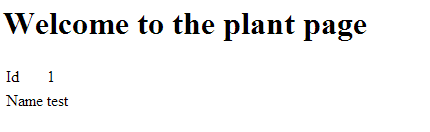
<!DOCTYPE html> <html> <head> <title></title> </head> <body> <h1>Welcome to the plant page</h1> <table> <tr> <td>Id</td> <td>@Model.Id</td> </tr> <tr> <td>Name</td> <td>@Model.Name</td> </tr> </table> </body> </html>``` And here is the View for my PlantsModel.
```html @Inherits Nancy.ViewEngines.Razor.NancyRazorViewBase(Of WebApplication2.Model.PlantsModel)
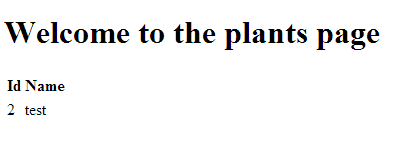
<!DOCTYPE html PUBLIC “-//W3C//DTD XHTML 1.0 Transitional//EN” “http://www.w3.org/TR/xhtml1/DTD/xhtml1-transitional.dtd"> <html xmlns=“http://www.w3.org/1999/xhtml"> <head> <title></title> </head> <body> <h1>Welcome to the plants page</h1> <table> <tr><th>Id</th><th>Name</th></tr> @For Each plant As WebApplication2.Model.PlantModel In Model.Plants @<tr> <td>@plant.Id</td> <td>@plant.Name</td> </tr> Next </table> </body> </html>``` Look at the for each I have in there.
The module
The next is my module, which I would like to split up in two pieces next time. Because small is better, but for now this works.
```vbnet Imports WebApplication2.Model Imports Nancy
Public Class PlantsModule Inherits NancyModule
Public Sub New()
    MyBase.Get("/plants") = Function(parameters)
                                Return View(New PlantsModel() With {.Plants = New List(Of PlantModel) From {New PlantModel() With {.Id = 2, .Name = "test"}}})

                            End Function
    MyBase.Get("/plants/{Id}") = Function(parameters)
                                     If parameters.id = 1 Then
                                         Return View(New PlantModel() With {.Id = 1, .Name = "test"})
                                     Else
                                         Return View(New PlantModel() With {.Id = 2, .Name = "test"})
                                     End If
                                 End Function

End Sub
End Class``` As you can see I have a Plants route which will show you all the plants. And A plants route which accepts an id which I can read and send the data as requested. Not very good at this point in time but you get the drift.
And these are the results of the Belgian jury.
When using the url http://localhost/plants I get this.
When using the url http://localhost/plants/1 I get this.
And when using http://localhost/plants/abc I get an exception of course.

And this funny little fellow on my page.

Conclusion
Everything seemed to be reasonable, lost a little time with the webconfig thing and looking up syntax for razor, but it was pretty much ok and smooth for the rest.
 Chris is awesome.
