



Introduction
So I have been doing this Nancy series for a while now and the demoproject is still up at Github.
Today I’m going to try and return a pdf from a request.
The Response.
So instead of returning json or html or some such I want to return a pdf page. I guess I could write a complete viewengine if needed but I don’t need that I just want my trees module to return a pdf in a certain format when requested.
This is actually very simple to do you just need to return an object that inherits from Response and that makes the pdf. I used itextsharp to make the pdf and Nancy did all the heavy lifting from there on in ;-). ITextsharp is on nuget so you should use that.
And here is my response.
using System;
using System.IO;
using Nancy;
using NancyDemo.Csharp.Model;
using iTextSharp.text;
using iTextSharp.text.pdf;
namespace NancyDemo.Csharp.Processors
{
public class TreeModelPdfResponse : Response
{
public TreeModelPdfResponse(TreeModel model)
{
this.Contents = GetPdfContents(model);
this.ContentType = "application/pdf";
this.StatusCode = HttpStatusCode.OK;
}
private Action<Stream> GetPdfContents(TreeModel model)
{
return stream =>
{
var oDoc = new Document(PageSize.A4);
PdfWriter.GetInstance(oDoc, stream);
oDoc.Open();
oDoc.Add(new Paragraph("This a Tree"));
oDoc.Add(new Paragraph("Id: " + model.Id));
oDoc.Add(new Paragraph("Genus: " + model.Genus));
oDoc.Close();
};
}
}
}```
And in my Treesmodule I will add this Get-method.
```csharp
Get["/trees/pdf/{Id}"] = parameters =>
{
int result;
var isInteger = int.TryParse(parameters.id, out result);
var tree = treeService.FindById(result);
if (isInteger && tree != null)
{
return new TreeModelPdfResponse(tree);
}
else
{
return HttpStatusCode.NotFound;
}
};```
So if I now go to my page http://localhost/trees/pdf/1 I will get my custom pdf.
<div class="image_block">
<a href="/wp-content/uploads/users/chrissie1/nancy/nancy19.png?mtime=1356877809"><img alt="" src="/wp-content/uploads/users/chrissie1/nancy/nancy19.png?mtime=1356877809" width="463" height="211" /></a>
</div>
Or I can just embed it in an iframe of course.
<div class="image_block">
<a href="/wp-content/uploads/users/chrissie1/nancy/nancy20.png?mtime=1356877897"><img alt="" src="/wp-content/uploads/users/chrissie1/nancy/nancy20.png?mtime=1356877897" width="471" height="310" /></a>
</div>
Which would look like this in our code.
```xml
<div id="pdf">
<iframe width="400" height="500" src="/trees/pdf/@Model.Id" id="pdf_content" />
</div>
Now that was pretty simples, huh.
Content negotiation.
Of course you might have noticed that my get looks a lot like the get I already have and a pdf is just a MIME-type like json or xml. So if I could just tell my service that I want application/pdf than why wouldnt it just give me that? Well it can.
To test this I used easyhttp (because I could not find how to do this from within a html page(yet).
using System;
using System.IO;
using EasyHttp.Http;

namespace NancyDemo.Csharp.Easyhttp
{
    class Program
    {
        private static void Main(string[] args)
        {
            var http = new HttpClient();
            http.Request.Accept = "application/pdf";
            http.Request.ParametersAsSegments = true;
            http.GetAsFile("http://localhost:65367/trees/1", "e:\temp\Test.pdf");
            Console.ReadLine();
        }
    }
}
My Get in my NancyModule uses the Negotiate.
Like this.
csharp
Get["/trees/{Id}"] = parameters =>
                {
                    int result;
                    var isInteger = int.TryParse(parameters.id, out result);
                    var tree = treeService.FindById(result);
                    if(isInteger && tree != null)
                    {
                        return Negotiate.WithModel(tree);
                    }
                    else
                    {
                        return HttpStatusCode.NotFound;
                    }
                };
I then just need to add a Processor class.
```csharp using System; using System.Collections.Generic; using Nancy; using Nancy.Responses.Negotiation;
namespace NancyDemo.Csharp.Processors { public class PdfProcessor : IResponseProcessor { private static readonly IEnumerable<Tuple<string, MediaRange>> extensionMappings = new[] { new Tuple<string, MediaRange>(“pdf”, MediaRange.FromString(“application/pdf”)) };
    public ProcessorMatch CanProcess(MediaRange requestedMediaRange, dynamic model, NancyContext context)
    {
        if (IsExactPdfContentType(requestedMediaRange))
        {
            return new ProcessorMatch
                {
                    ModelResult = MatchResult.DontCare,
                    RequestedContentTypeResult = MatchResult.ExactMatch
                };
        }

        return new ProcessorMatch
        {
            ModelResult = MatchResult.DontCare,
            RequestedContentTypeResult = MatchResult.NoMatch
        };
    }

    private static bool IsExactPdfContentType(MediaRange requestedContentType)
    {
        if (requestedContentType.Type.IsWildcard && requestedContentType.Subtype.IsWildcard)
        {
            return true;
        }

        return requestedContentType.Matches("application/pdf");
    }

    public Response Process(MediaRange requestedMediaRange, dynamic model, NancyContext context)
    {
        return new PdfResponse(model);
    }

    public IEnumerable<Tuple<string, MediaRange>> ExtensionMappings
    {
        get { return extensionMappings; }
    }
}
}``` And a response class.
```csharp using System; using System.IO; using Nancy; using NancyDemo.Csharp.Model; using iTextSharp.text; using iTextSharp.text.pdf;
namespace NancyDemo.Csharp.Processors { public class PdfResponse<TModel> : Response { public PdfResponse(TModel model) { this.Contents = GetPdfContents(model); this.ContentType = “application/pdf”; this.StatusCode = HttpStatusCode.OK; }
    protected virtual Action<Stream> GetPdfContents(TModel model)
    {
        return stream =>
            {
                var oDoc = new Document(PageSize.A4);
                PdfWriter.GetInstance(oDoc, stream);
                oDoc.Open();
                foreach (var prop in model.GetType().GetProperties())
                {
                    oDoc.Add(new Paragraph(prop.Name + ":" + prop.GetValue(model).ToString()));
                }
                oDoc.Close();
            };
    }
}

public class PdfResponse : PdfResponse<object>
{
    public PdfResponse(object model)
        : base(model)
    {
    }
}
}``` This will work for other objets than TreeModel too, it’s far from complete though.
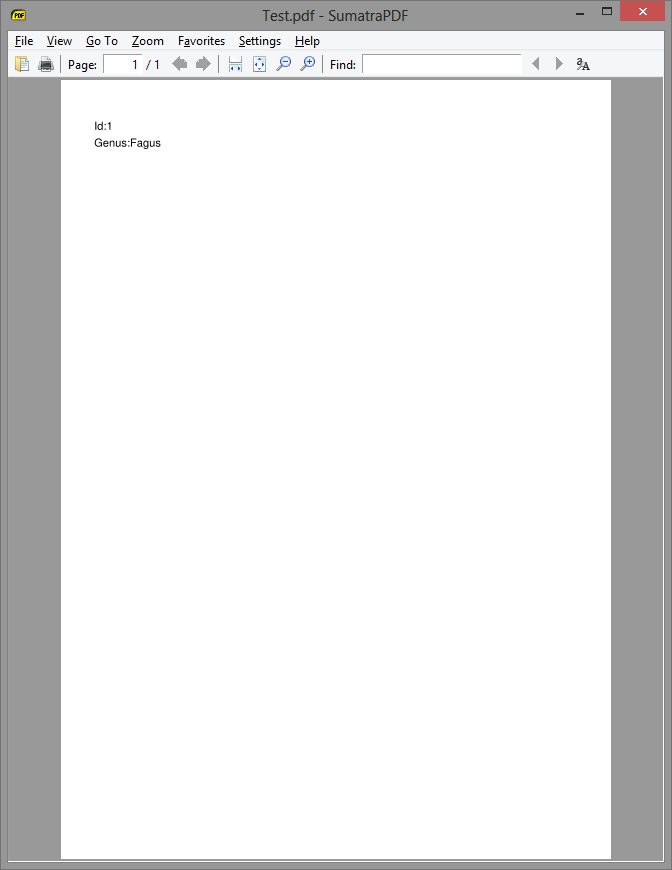
And now my servicecall with easyhttp will create a file for me and that looks like this.
Conclusion
Again that was easy. But if anyone can tell me how to get the content negotiation to work from within a html page I would be even more happy.
 Chris is awesome.
