



Introduction.
From time to time you need to show data in a grid. And I picked jtable and Nancy to make that happen. Because reinventing the wheel is not something you want to do every week.
Installation
Everything you need can be found on Nuget. And this is what I needed.
- jQuery
- jQuery.UI.Combined
- jTable
- Nancy
- Nancy.Hosting.Aspnet
- Nancy.Viewengines.Razor
I then copied all the scripts to the content folder, because that is the convention for Nancy. It is kind of sad that the jtable has no dependency on jquery or jqueryUI but I survived.
Our first grid
So now we need to get our first grid to fill up with some data.
First we need a model.
csharp
namespace NancyJTable.Models
{
    public class PlantModel
    {
        public int Id { get; set; }
        public string Name { get; set; }
        public string Genus { get; set; }
        public string Species { get; set; }
    }
}
The above is for our data.
And we will need another model.
```csharp using System.Collections.Generic;
namespace NancyJTable.Models { public class PlantsModel { public string Result { get; set; } public IList<PlantModel> Records { get; set; } } }``` We need this model so we can send this data as json to our jtable grid. jTable uses ajax to get the data and the above will make it easy for it to know what to put where.
Then I guess we need a module.
```csharp using System.Collections.Generic; using Nancy; using Nancy.ModelBinding; using NancyJTable.Models;
namespace NancyJTable.Modules { public class PlantsModule:NancyModule {
    public PlantsModule()
    {
        Get["/"] = parameters => View["Plants"];
        Post["/plants"] = parameters =>
            {
                var plantsModel = new PlantsModel
                    {
                        Result = "OK",
                        Records = new List<PlantModel>(),
                    };
                for (var i = 1; i < 25; i++)
                {
                    plantsModel.Records.Add(new PlantModel()
                        {
                            Id = i,
                            Name = "name" + i,
                            Genus = "genus" + i,
                            Species = "Species" + i
                        });
                }
                return Response.AsJson(plantsModel);
            };
    }
}
}``` In the above we have a Get to show our page and a Post for jtable to get it’s data in JSON format. A bit strange to use a POST for that but hey who am I to complain.
And last but not least I need a View.
```html @using Nancy <!DOCTYPE html>
<html> <head> <title>Plants</title> <link href=“@Url.Content(”~/Content/Scripts/jtable/themes/metro/blue/jtable.min.css”)” rel=“stylesheet” type=“text/css” /> <script src=“@Url.Content(”~/Content/Scripts/jquery-1.9.0.min.js”)” type=“text/javascript”></script> <script src=“@Url.Content(”~/Content/Scripts/jquery-ui-1.10.0.min.js”)” type=“text/javascript”></script> <script src=“@Url.Content(”~/Content/Scripts/jtable/jquery.jtable.min.js”)” type=“text/javascript”></script> <script type=“text/javascript”> $(document).ready(function () { $(‘#PlantsTableContainer’).jtable({ title: ‘Table of plants’, actions: { listAction: ‘/plants’, }, fields: { Id: { key: true, list: true, width: ‘10%’ }, Name: { title: ‘Name’, width: ‘30%’ }, Genus: { title: ‘Genus’, width: ‘30%’ }, Species: { title: ‘Species’, width: ‘30%’ } } }); $(‘#PlantsTableContainer’).jtable(‘load’); }); </script> </head> <body> <div> <div id=“PlantsTableContainer”></div> </div> </body> </html>``` The listAction is the url where jtable can get it’s list. Then you define the different columns and then you do a load so that the data gets filled.
And you need a div somewhere with an id that you use in the javascript. In my case PlantsTableContainer.
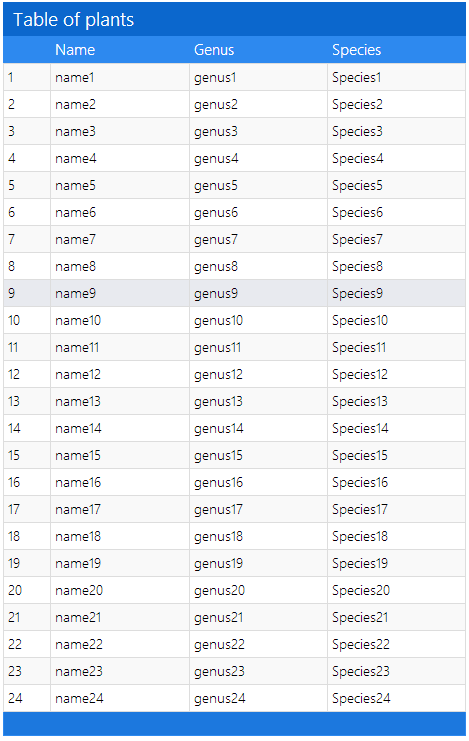
And here is the result of all that hard work.
Conclusion
The fact that you need a Post to Get the data is a bit of a weird choice but it becomes clear why they did that when we learn how to do paging and sorting in our next post.
 Chris is awesome.
