



Introduction
I have been using Nancy for a few weeks now and made a demo application that you can find on Github.
Today I will add the ability for you to add a picture to a user.
The upload
For this we need to change our UsersModule and add a few methods.
First we add a get so that we can show a page with the userdata and an upload form. Something like this.
Get["/users/userimageupload/{Id}"] = parameters =>
            {
                Guid result;
                var isGuid = Guid.TryParse(parameters.id, out result);
                var user = userService.GetById(result);
                if (isGuid && user != null)
                {
                    return View["UploadUserImage",user];
                }
                return HttpStatusCode.NotFound;
            };
            ```
Nothing special there, we just ask for the Id, check if it is there and if it is we show the view.

This will use the following view.

```xml
@inherits Nancy.ViewEngines.Razor.NancyRazorViewBase<NancyDemo.Csharp.Model.UserModel>
@{
    ViewBag.Title = "Add user image page";
    Layout = "Master.cshtml";
}


@section menu
{
Rendersection("menu")
}
@section menuitems
{
    <a href="/users">Users</a>
}

<h1>Welcome to the add user image page</h1>
<table>
    <tr>
        <td>Id</td>
        <td>@Model.Id</td>
    </tr>
    <tr>
        <td>Name</td>
        <td>@Model.Name</td>
    </tr>
    <tr>
        <td>RealName</td>
        <td>@Model.RealName</td>
    </tr>
    <tr>
        <td>Password</td>
        <td>@Model.Password</td>
    </tr>
</table>
<form action="/users/userimageupload/@Model.Id" method="post" enctype="multipart/form-data">
    <input name="upload" type="file" size="40" />
    <input type="submit" value="Post!" />
</form>
This will look something like this.
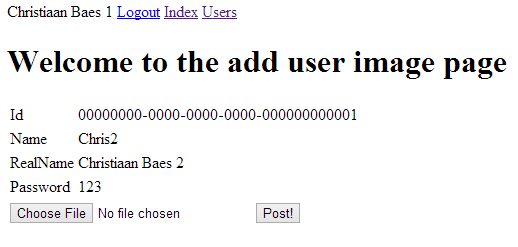
All the userdata is shown and the form to upload the file.
Now we need a Post method in our module to intercept when the user clicks on post.
Post["/users/userimageupload/{Id}"] = parameters =>
{
Guid result;
var isGuid = Guid.TryParse(parameters.Id, out result);
var user = userService.GetById(result);
var file = this.Request.Files.FirstOrDefault();
if (isGuid && user != null && file != null)
{
var fileDetails = string.Format("{3} - {0} ({1}) {2}bytes", file.Name, file.ContentType, file.Value.Length, file.Key);
user.FileDetails = fileDetails;
var filename = Path.Combine(pathProvider.GetRootPath(), "Images", user.Id + ".jpeg");
using (var fileStream = new FileStream(filename, FileMode.Create))
{
file.Value.CopyTo(fileStream);
}
return View[user];
}
return HttpStatusCode.NotFound;
};```
This accepts an Id as parameter. and saves the first file in the stream to a folder in our project called Images and saves the filedetails in the user object. You can also see that we use the pathprovider. We can inject this pathprovider in our module via the constructor like this.
<code class="codespan">public UsersModule(UserService userService, IRootPathProvider pathProvider)</code>
And as you can see we return to our userpage.
## The user
The userpage needs to show the image.
We do this by adding a Get to our usermodule.
```csharp
Get["/users/getimage/{Id}"] = parameters =>
{
Guid result;
var isGuid = Guid.TryParse(parameters.Id, out result);
var filename = Path.Combine(pathProvider.GetRootPath(), "Images", result.ToString() + ".jpeg");
if (!File.Exists(filename)) filename = Path.Combine(pathProvider.GetRootPath(), "Images", "emptyuser.jpeg");
var stream = new FileStream(filename, FileMode.Open);
return Response.FromStream(stream, "image/jpeg");
};```
This looks to see if an image exists and if not than it shows a default image.
With picture.
<div class="image_block">
<a href="/wp-content/uploads/users/chrissie1/nancy/nancy17.png?mtime=1356701376"><img alt="" src="/wp-content/uploads/users/chrissie1/nancy/nancy17.png?mtime=1356701376" width="654" height="662" /></a>
</div>
With default picture.
<div class="image_block">
<a href="/wp-content/uploads/users/chrissie1/nancy/nancy18.png?mtime=1356701492"><img alt="" src="/wp-content/uploads/users/chrissie1/nancy/nancy18.png?mtime=1356701492" width="365" height="425" /></a>
</div>
This means our view is changed a little bit.
```xml
@inherits Nancy.ViewEngines.Razor.NancyRazorViewBase<NancyDemo.Csharp.Model.UserModel>
@{
ViewBag.Title = "User page";
Layout = "Master.cshtml";
}
@section menu
{
RenderSection("menu")
}
@section menuitems
{
<a href="/users">Users</a>
}
<h1>Welcome to the user page</h1>
<table>
<tr>
<td>Id</td>
<td>@Model.Id</td>
</tr>
<tr>
<td>Name</td>
<td>@Model.Name</td>
</tr>
<tr>
<td>RealName</td>
<td>@Model.RealName</td>
</tr>
<tr>
<td>Password</td>
<td>@Model.Password</td>
</tr>
<tr>
<td>FileDetails</td>
<td>@Model.FileDetails</td>
</tr>
</table>
<a href="/users/userimageupload/@Model.Id">Upload image</a><br />
<img src="/users/getimage/@Model.Id"/>
And that’s it
Conclusion
It’s not all that hard to do, once you know how.
Special thanks to jchannon, Grumpydev and TheCodeJunkie for the help.
 Chris is awesome.
