


Login or Sign Up to become a member!
LessThanDot Sit Logo

LessThanDot

System Admins

Less Than Dot is a community of passionate IT professionals and enthusiasts dedicated to sharing technical knowledge, experience, and assistance. Inside you will find reference materials, interesting technical discussions, and expert tips and commentary. Once you register for an account you will have immediate access to the forums and all past articles and commentaries.

LTD Social Sitings

Lessthandot twitter Lessthandot Linkedin Lessthandot friendfeed Lessthandot facebook Lessthandot rss

Note: Watch for social icons on posts by your favorite authors to follow their postings on these and other social sites.

Your profile

    Search

    XML Feeds

    Google Ads

    Making your own Local root CA and using it as an SSL certificate for intranet websites. »
    comments

    Introduction

    I admit I had been neglecting ChocolateyGUI for the last year or so. And it was no longer compatible with the current version of Chocolatey.

    But a few weeks ago a gentle soul called Miracula decided it was time to help and I made her a contributor the moment she did. After all it was my very first pull request ever and I was happy.

    This weekend I decided to give ChocolateyGUI some more of my love and attention. And noticed that Miracula had been very busy indeed.

    So I decided that it was time for a new package.

    And here it is.

    Installation

    Installation is very simple.

    1. cinst ChocolateyGUI

    That's it. As long as you have Chocolatey installed of course. But even that is easy to install.

    New features

    Just look how pretty it is.
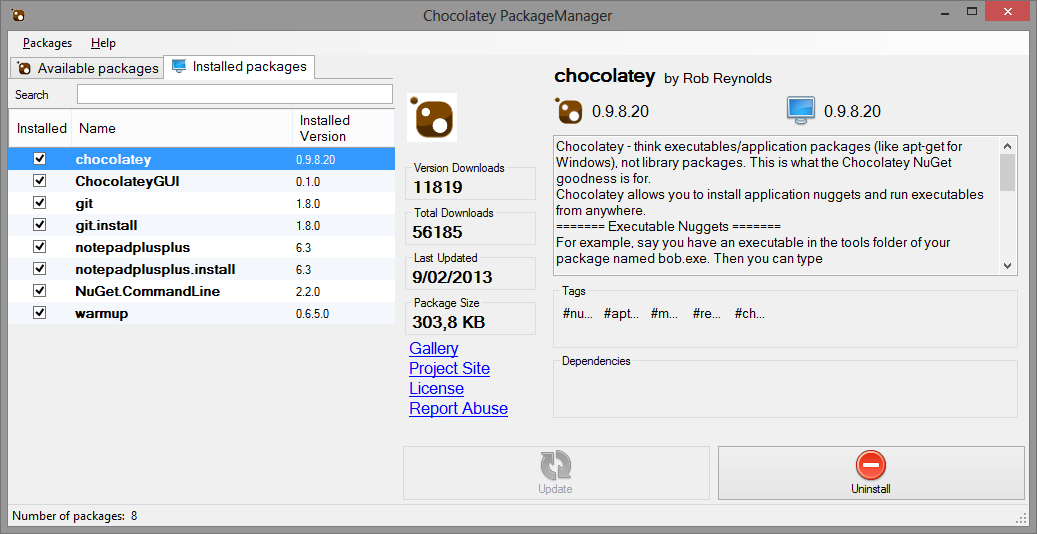
    You can search in the list. It is a StartsWith list.
    You can install the available package by clicking on the checkbox.
    You can uninstall a package.
    You can update chocolatey, because it will be in the list of installed packages.
    It is a lot faster.
    It shows a lot more information about the selected package.

    Open source

    And the code is still open source. And we accept pull-requests and feature requests.

    Conclusion

    I want to thank Miracula again for the awesome work she did.

    Update

    ChocolateyGUI has a dependecy on powershell 3.0. You can install that by doing cinst powershell. In the next version we wil install this as a dependency package.

    About the Author

    User bio imageChris is awesome.
    Social SitingsTwitterHomePageLTD RSS Feed
    InstapaperVote on HN

    7 comments

    Comment from: Brenton House [Visitor] · http://www.brentonhouse.com
    Brenton House I noticed that when I ran the GUI I got an exception. I do have the windows sdk installed. Is there something else that I am missing?

    file or assembly 'System.Management.Automation, Version=3.0.0.0, Culture=neutral, PublicKeyToken=31bf3856ad364e35' or one of its dependencies. The system cannot find the file specified.":"System.Management.Automation, Version=3.0.0.0, Culture=neutral, PublicKeyToken=31bf3856ad364e35"}
    02/12/13 @ 10:21
    Comment from: TonyL [Visitor]
    TonyL I start the GUI and all I get is some CPU access and the item shows in Task Manager and then goes away. Nothing happens.
    02/13/13 @ 12:50
    Comment from: Christiaan Baes (chrissie1) [Member]
    Christiaan Baes (chrissie1) You probably need to install powershell 3.0. Just do cinst powershell. Or download it here http://www.microsoft.com/en-us/download/details.aspx?id=34595
    In the next version this will be a dependency pacakge.
    02/13/13 @ 13:22
    Comment from: David W [Visitor] Email
    David W Whether I (re)install powershell or not, I get an immediate "CGUI has stopped working" immediately when I try to run it. This is on Win7-64Pro. I installed Chocolatey, then the GUI, then... crash on execute.

    Have I missed some dependencies; any other suggestions?
    02/20/13 @ 21:04
    Comment from: Christiaan Baes (chrissie1) [Member]
    Christiaan Baes (chrissie1) you should have the System.Management.Automation.dll in the GAC, this can be found here. %windows%\http://Microsoft.Net \assembly\GAC_MSIL\System.Management.Automation\v4.0_3.0.0.0__31bf3856ad364e35

    I heard from someone that a reboot after the install of powershell did the trick, probably because the dll was not registered or some other magic windows does on a reboot.
    02/20/13 @ 23:28
    Comment from: Christiaan Baes (chrissie1) [Member]
    Christiaan Baes (chrissie1) And yes there is also the dependency on .Net 4.0 but the installer should have warned you for that. And powershell 3.0 also needs it. So that should be ok, probably.
    02/20/13 @ 23:29
    Comment from: Christiaan Baes (chrissie1) [Member]
    Christiaan Baes (chrissie1) There will be a new version this weekend, if everything goes to plan.
    02/20/13 @ 23:30

    Leave a comment


    Your email address will not be revealed on this site.

    To mislead the spambots.

    Your URL will be displayed.
    (Line breaks become <br />)
    (Name, email & website)
    (Allow users to contact you through a message form (your email will not be revealed.)
