



Based on Scott Hanselman’ s blogpost named The Weekly Source Code 31- Single Instance WinForms and Microsoft.VisualBasic.dll
We all know about this little setting, right? At least now you do ;-).
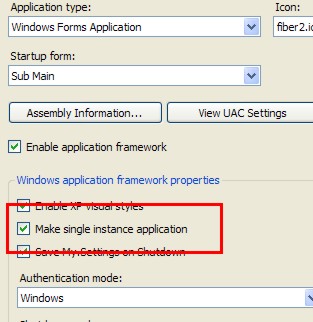
For you C# lovers don’t search for it, it’s only there in VB.Net.
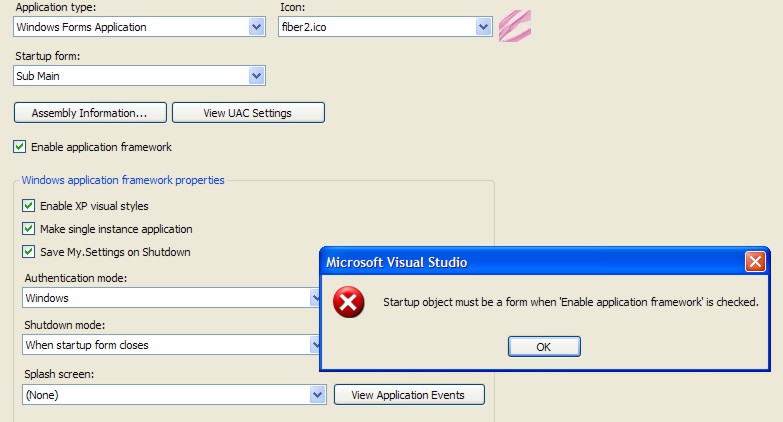
And this little nasty side effect.
<p>
That meant you had to have all your startupcode in the constructor or loadevent of that form (:'()
</p>
<p>
So Scott gave me the inspiration to do this.
</p>
<p>
First of all go back to the properties of your project and uncheck the “enable application framework” thing and never check it again :>. Then we can just have a sub main in a module.
</p>
<pre lang="vbnet">Module StartupModule
#Region “ Public methods “ “’ <summary> “’ Beginning of the application “’ </summary> “’ <remarks></remarks> Public Sub Main() Dim _StartUp As New Startup.StartUp _StartUp.Start() End Sub #End Region
End Module
<p>
And this is the Startup class
</p>
<pre lang="vbnet">Namespace Startup
''' <summary>
'''
''' </summary>
''' <remarks></remarks>
Public Class StartUp
Implements Interfaces.IStartUp
#Region “ private members “ “’ <summary> “’ “’ </summary> “’ <remarks></remarks> Private _Log As TDB2007.Utils.Logging.Logging.Interfaces.ILog #End Region
#Region “ Constructors “
“’ <summary>
“’
“’ </summary>
“’ <remarks></remarks>
Public Sub New()
End Sub
#End Region
#Region “ public method “ “’ <summary> “’ The start method for eassier unit testing “’ </summary> “’ <remarks></remarks> Public Sub Start() Implements Interfaces.IStartUp.Start CommonFunctions.IoC.IoCUtil.InsertConfigOfContainingType(Of View.Menu.IoC.ConfigureStructureMap)() log4net.Config.XmlConfigurator.Configure() Application.EnableVisualStyles() Dim controller As View.Menu.Startup.Interfaces.ISingleInstanceController = CommonFunctions.IoC.Container.Resolve(Of View.Menu.Startup.Interfaces.ISingleInstanceController)() CommonFunctions.IoC.Container.Resolve(Of Controller.Interfaces.IStart).Start() Try controller.Run(Environment.GetCommandLineArgs()) Catch Ex As Exception _Log = CommonFunctions.IoC.Container.Resolve(Of Utils.Logging.Logging.Interfaces.ILog)() _Log.LogWarning(“Unhandled Exception - ” & Ex.Message) _Log.LogWarning(“Stacktrace : “ & Ex.StackTrace) End Try End Sub #End Region
End Class
End Namespace
<p>
  Which calls our singleinstancecontroller.
</p>

<pre lang="vbnet">Imports Microsoft.VisualBasic.ApplicationServices
Namespace Startup “’ <summary> “’ “’ </summary> “’ <remarks></remarks> Public Class SingleInstanceController Inherits WindowsFormsApplicationBase Implements Interfaces.ISingleInstanceController
#Region “ Constructors “ “’ <summary> “’ “’ </summary> “’ <remarks></remarks> Public Sub New() IsSingleInstance = True End Sub #End Region
#Region “ Evenhandlers “ “’ <summary> “’ When the user tries to open our application again then menu will just become visible and be pushed to the front. “’ </summary> “’ <param name=“sender”></param> “’ <param name=“e”></param> “’ <remarks></remarks> Private Sub this_StartupNextInstance(ByVal sender As Object, ByVal e As StartupNextInstanceEventArgs) Handles MyBase.StartupNextInstance Me.MainForm.Show() Me.MainForm.BringToFront() End Sub #End Region
#Region “ public methods “ “’ <summary> “’ When the application is run the first time this method is called. “’ </summary> “’ <remarks>We make a new instance of the Menu and it will be shown</remarks> Protected Overrides Sub OnCreateMainForm() MainForm = CType(CommonFunctions.IoC.Container.Resolve(Of Forms.Interfaces.IMenu)(), System.Windows.Forms.Form) End Sub
    ''' <summary>
    '''
    ''' </summary>
    ''' <param name="args"></param>
    ''' <remarks></remarks>
    Public Shadows Sub Run(ByVal args As String()) Implements Interfaces.ISingleInstanceController.Run
        MyBase.Run(args)
    End Sub
#End Region
End Class
End Namespace
<p>
  A working project/solution to download.
</p>

<p>
  <a href="/wp-content/uploads/blogs/DesktopDev/SingleInstance.zip" title="">SingleInstance.zip</a>
</p>
 Chris is awesome.
