


Login or Sign Up to become a member!
LessThanDot Sit Logo

LessThanDot

Desktop Developer

Less Than Dot is a community of passionate IT professionals and enthusiasts dedicated to sharing technical knowledge, experience, and assistance. Inside you will find reference materials, interesting technical discussions, and expert tips and commentary. Once you register for an account you will have immediate access to the forums and all past articles and commentaries.

LTD Social Sitings

Lessthandot twitter Lessthandot Linkedin Lessthandot friendfeed Lessthandot facebook Lessthandot rss

Note: Watch for social icons on posts by your favorite authors to follow their postings on these and other social sites.

Your profile

    Search

    XML Feeds

    Google Ads

    « Multithreaded ping shown in a grid C# versionNuGet stats »
    comments

    Today I wanted a way to see which of my cameras were online at a certain point in time. Pinging them is a great way of doing that, it at least says they are there and the first two layers of the OSI model are working (if I remember correctly).

    Doing a ping to another computer in VB.Net is easy.

    1. Dim _ping As New Ping
    2. Dim _pingreply = _ping.Send(IpAddress, 2000)
    3. If _pingreply.Status = IPStatus.Success Then
    4. Like this.

    The first parameter of Ping.Send is the IpAddress as string and the second is the timeout in this case 2 seconds.

    I want to ping 5 cameras at a time to worst case this will take 10 seconds. 10 seconds is a long time to wait for a user who's attention span is 3 seconds. So we need a way to do this asynchronously.

    So I create a grid with 2 columns and 5 rows. First column has the Ipaddresses and the second will show the result.

    Here is how.

    1. Private Sub Form1_Load(ByVal sender As Object, ByVal e As EventArgs) Handles Me.Load
    2.   fGrid.Columns.Add("Ip", "Ip")
    3.   fGrid.Columns.Add("Ping", "Ping")
    4.   fGrid.Columns(0).Width = 100
    5.   fGrid.Columns(1).AutoSizeMode = DataGridViewAutoSizeColumnMode.Fill
    6.   For i As Integer = 0 To 4
    7.     Dim myRowIndex = fGrid.Rows.Add()
    8.       fGrid.Rows(myRowIndex).Cells(0).Value = "10.216.110." & (11 + myRowIndex).ToString
    9.   Next
    10. End Sub

    Looks like this.

    So now that we have that we can do the pings in another thread. So I made a button to spawn this thread and begin the process.

    1. Private fThread = New Thread(New ThreadStart(AddressOf ThreadProc))
    2. fThread.IsBackground = True
    3. fThread.Start()

    and this will use the following things.

    1. Private Sub ThreadProc()
    2.         Parallel.For(0, 5, Sub(b)
    3.                                CheckOnline(b)
    4.                            End Sub)
    5.     End Sub
    6.  
    7. Private Sub CheckOnline(ByVal rowindex As Integer)
    8.         Dim _ping As New Ping
    9.         Try
    10.             Dim _pingreply = _ping.Send("10.216.110." & (11 + rowindex).ToString, 2000)
    11.             If _pingreply.Status = IPStatus.Success Then
    12.                 SyncLock success
    13.                     success.Add(rowindex)
    14.                 End SyncLock
    15.             End If
    16.         Catch ex As Exception
    17.         End Try
    18.     End Sub

    Yep I used a parallel foreach that will spawn 5 more threads to do the pings in parallel for me.

    But I also needed a way to tell my users I was doing something and a way to tell them it was all finished and the result.

    I did that with a second thread that check the result in a list and sees if they are done, making sure I synchronize the lists add method because that is not threadsafe.

    1. Imports System.Threading
    2. Imports System.Threading.Tasks
    3. Imports System.Net.NetworkInformation
    4.  
    5. Partial Public Class Form1
    6.  
    7.     Private fThread As Thread
    8.     Private fThread2 As Thread
    9.  
    10.     Public Delegate Sub AddRowDelegate(ByVal column As Integer)
    11.     Delegate Sub CheckOnlineDelegate(ByVal rowindex As Integer)
    12.     Delegate Sub SetOnlineDelegate(ByVal rowindex As Integer)
    13.  
    14.     Private Sub Form1_Load(ByVal sender As Object, ByVal e As EventArgs) Handles Me.Load
    15.         fGrid.Columns.Add("Ip", "Ip")
    16.         fGrid.Columns.Add("Ping", "Ping")
    17.         fGrid.Columns(0).Width = 100
    18.         fGrid.Columns(1).AutoSizeMode = DataGridViewAutoSizeColumnMode.Fill
    19.         For i As Integer = 0 To 4
    20.             Dim myRowIndex = fGrid.Rows.Add()
    21.             fGrid.Rows(myRowIndex).Cells(0).Value = "10.216.110." & (11 + myRowIndex).ToString
    22.         Next
    23.     End Sub
    24.  
    25.     Private Sub ThreadProc()
    26.         Parallel.For(0, 5, Sub(b)
    27.                                Do While Not done.Contains(b)
    28.                                    fGrid.Invoke(New AddRowDelegate(AddressOf AddRow), New Object() {b})
    29.                                    Thread.Sleep(300)
    30.                                Loop
    31.                                fGrid.Invoke(New SetOnlineDelegate(AddressOf SetOnline), New Object() {b})
    32.                            End Sub)
    33.     End Sub
    34.  
    35.     Private Sub ThreadProc2()
    36.         Parallel.For(0, 5, Sub(b)
    37.                                CheckOnline(b)
    38.                            End Sub)
    39.     End Sub
    40.  
    41.    
    42.     Private Sub AddRow(ByVal rowindex As Integer)
    43.         If fGrid.Rows(rowindex).Cells(1).Value Is Nothing OrElse fGrid.Rows(rowindex).Cells(1).Value.ToString.Contains(".....") OrElse Not fGrid.Rows(rowindex).Cells(1).Value.ToString.Contains("Pinging") Then
    44.             fGrid.Rows(rowindex).Cells(1).Value = "Pinging 10.216.110." & (11 + rowindex).ToString & " "
    45.         Else
    46.             fGrid.Rows(rowindex).Cells(1).Value = fGrid.Rows(rowindex).Cells(1).Value.ToString & "."
    47.         End If
    48.         fGrid.Rows(rowindex).Cells(1).Style.BackColor = Drawing.Color.White
    49.     End Sub
    50.  
    51.     Private success As New List(Of Integer)
    52.     Private done As New List(Of Integer)
    53.  
    54.     Private Sub CheckOnline(ByVal rowindex As Integer)
    55.         Dim _ping As New Ping
    56.         Try
    57.             Dim _pingreply = _ping.Send("10.216.110." & (11 + rowindex).ToString, 2000)
    58.             If _pingreply.Status = IPStatus.Success Then
    59.                 SyncLock success
    60.                     success.Add(rowindex)
    61.                 End SyncLock
    62.             End If
    63.         Catch ex As Exception
    64.         End Try
    65.         SyncLock done
    66.             done.Add(rowindex)
    67.         End SyncLock
    68.     End Sub
    69.  
    70.     Private Sub SetOnline(ByVal rowindex As Integer)
    71.         If Not success.Contains(rowindex) Then
    72.             fGrid.Rows(rowindex).Cells(1).Value = "Offline"
    73.             fGrid.Rows(rowindex).Cells(1).Style.BackColor = Drawing.Color.Red
    74.         Else
    75.             fGrid.Rows(rowindex).Cells(1).Value = "Online"
    76.             fGrid.Rows(rowindex).Cells(1).Style.BackColor = Drawing.Color.Green
    77.         End If
    78.     End Sub
    79.  
    80.     Private Sub PingToolStripMenuItem_Click(ByVal sender As System.Object, ByVal e As System.EventArgs) Handles PingToolStripMenuItem.Click
    81.         done = New List(Of Integer)
    82.         success = New List(Of Integer)
    83.         fThread = New Thread(New ThreadStart(AddressOf ThreadProc))
    84.         fThread.IsBackground = True
    85.         fThread.Start()
    86.         fThread2 = New Thread(New ThreadStart(AddressOf ThreadProc2))
    87.         fThread2.IsBackground = True
    88.         fThread2.Start()
    89.     End Sub
    90.    
    91. End Class

    As you can see I invoke the SetOnline and AddRow methods via the grid so that it can be handled in a thread safe way. I also use delegates for that.

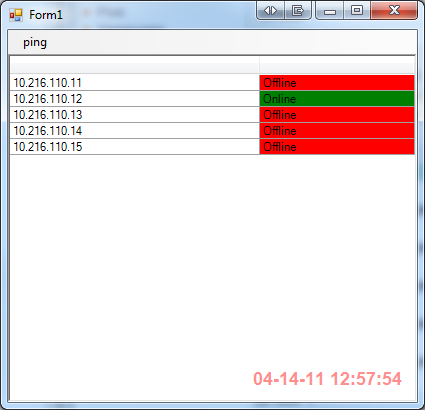
    While running it you will see that if one is online it will turn green immediately or very fast.

    Look also that the Parallel For second parameter is Exclusive To so it does not translate into For i as integer = 0 to 5 but it translates into For i as integer = 0 to 4.

    And that you have to wait for about 2 (timeout we used) seconds for all the others to turn red.
    Writing thread safe code is tricky but I think I covered all the bases to make this as thread safe as possible without getting race conditions.

    Any questions?

    About the Author

    User bio imageChris is awesome.
    Social SitingsTwitterHomePageLTD RSS Feed
    InstapaperVote on HN

    15 comments

    Comment from: Ted Krueger (onpnt) [Member]
    Ted Krueger (onpnt) That, sir, is very cool! I can see a ton of applicable uses for this for someone like me that probably would have a hard time writing it on my own. (now I just need to convert it to C# :P )

    Nice post, Chris!
    04/14/11 @ 17:55
    Comment from: Naomi Nosonovsky [Member]
    Naomi Nosonovsky Great post!
    04/14/11 @ 18:28
    Comment from: eXii [Visitor]
    eXii Exactly what i'm looking for
    thanks so much !
    06/15/11 @ 15:12
    Comment from: inzane [Member] Email
    inzane Do you have this as a project to download? I'm looking to use this as a base for server monitor software. I wrote one using 3 columns(up/down/rebooted), but it is not threaded.
    07/23/11 @ 23:05
    Comment from: Alex [Visitor]
    Alex Hi,
    What if I want to check 100 ip's 5 at a time? What do I need to change in the code to accomplish this. I've been working on it for several hours with no luck.
    01/22/12 @ 11:58
    Comment from: Christiaan Baes (chrissie1) [Member]
    Christiaan Baes (chrissie1) You need to change a lot since you need to have a way to tell when the 5 previous threads have finished. Not something that is going to be to easy, I might look at it later this week.
    01/22/12 @ 12:11
    Comment from: Alex [Visitor]
    Alex Thanks! I appreciate that :)
    01/23/12 @ 01:20
    Comment from: Alex [Visitor]
    Alex Will it also be possible to pause/resume checking as this would be handy?
    01/23/12 @ 01:24
    Comment from: Hans De Leenheer [Visitor] · http://www.twitter.com/hansdeleenheer
    Hans De Leenheer It's layer 2 if you are pinging in the same VLAN. Otherwise your testing up to layer 3 :-)
    01/23/12 @ 03:12
    Comment from: Christiaan Baes (chrissie1) [Member]
    Christiaan Baes (chrissie1) Dear Hans,

    What can I say, sometimes you are just smarter than me.
    01/23/12 @ 04:54
    Comment from: Christiaan Baes (chrissie1) [Member]
    Christiaan Baes (chrissie1) Here it is Alex, just for you.

    http://blogs.lessthandot.com/index.php/DesktopDev/MSTech/VBNET/multithreading-pings-and-pausing-and
    01/23/12 @ 06:10
    Comment from: toto [Visitor] · http://toto-share.com
    toto Hi Christiaan,
    Thank you for this tutorial.
    I get many of learning how to ping other computer by vb.net
    Thank you
    01/23/12 @ 06:57
    Comment from: glucoz [Member] Email
    glucoz Hi,

    I try for some time to create an application in vb.net that allows pinging a list of IP addresses in an Excel file retrieved and displayed in a DataGridView.
    I stumbled upon your blog and I must admit that your idea of "Multithreading pings" is really excellent!

    Unfortunately, I can not seem to integrate my code into your.

    Here is my code:
    http://pastebin.com/g5AMJBr1

    Wish I could ping the IP addresses of the lists "server ip", "ip switch" and "IP router" in my DataGridView
    and display the result in the respective boxes "state server", "" state switch "and" router status ".

    Here is the preview of the DataGridView
    http://img11.hostingpics.net/pics/123901Capture.png


    If you have a can of time for me to help me solve my problem, I'll tighten very reconnaisant.

    thank you

    Ps: sorry for my english


    02/03/12 @ 15:20
    Comment from: rampatter [Visitor] · http://net-informations.com
    rampatter Here is a multithreaded chat programming in vb.net

    http://vb.net-informations.com/communications/vb.net_chat_server_program.htm

    ptr.
    04/10/12 @ 12:07
    Comment from: rough [Visitor] Email
    rough Hi great blog

    Any chance some or Christiaan has this as zipped project as I’m a beginner I’m unable to replicate the great work above,

    Appreciate any assistance.
    Thanks

    05/07/13 @ 01:31

    Leave a comment


    Your email address will not be revealed on this site.

    To mislead the spambots.

    Your URL will be displayed.
    (Line breaks become <br />)
    (Name, email & website)
    (Allow users to contact you through a message form (your email will not be revealed.)
