Login or Sign Up to become a member!
LessThanDot Sit Logo

LessThanDot

Desktop Developer

Less Than Dot is a community of passionate IT professionals and enthusiasts dedicated to sharing technical knowledge, experience, and assistance. Inside you will find reference materials, interesting technical discussions, and expert tips and commentary. Once you register for an account you will have immediate access to the forums and all past articles and commentaries.

LTD Social Sitings

Lessthandot twitter Lessthandot Linkedin Lessthandot friendfeed Lessthandot facebook Lessthandot rss

Note: Watch for social icons on posts by your favorite authors to follow their postings on these and other social sites.

Your profile

    Search

    XML Feeds

    Google Ads

    « Using Razor as an Embedded Report EngineHandling of events a small difference between C# and VB.Net »
    comments

    Introduction

    We all know string concatenation is bad when working with SQL-statements because of the sql-injection that can occur. So we avoid that by using parameters. But string concatenation is bad in all your code because of the immutability of strings. You can avoid those bad things by using String.Format or StringBuilder.

    But it ain't all that simple why and when you want and need to use either of the two. After all readibility and maintainability are rarely a consideration for the two.

    Here are some things to read.

    If you read the above blogs the need for Stringbuilder is mainly a speed thing. But it only helps much when you have enough concatenations and then some. It is still good practice to use the stringbuilder if you need to concatenate several strings together. And in the programming world 99% of string need concatenating.

    String.Format

    Now why would I prefer for you to use String.Format over a normal concatenation?

    String concatenation

    1. Dim s1 as String = "1"
    2. Dim s2 as String = "1"
    3. Dim s3 as String = "1"
    4. Dim s4 as String = "1"
    5. Dim s5 as String
    6. s5 = s1 & " " & s2 & " " & s3 & " " & s4

    String.Format

    1. Dim s1 as String = "1"
    2. Dim s2 as String = "1"
    3. Dim s3 as String = "1"
    4. Dim s4 as String = "1"
    5. Dim s5 as String
    6. s5 = string.Format("{0} {1} {2} {3}",s1, s2 ,s3 ,s4)

    The result of the two statements is the same and we don't really do premature optimization so we don't care which one of the two is faster. But the String.Format one just seems to be better at telling me what it does. So I prefer that one.

    Resharper

    Now that I know I want my code to use either stringbuilder, String.Format or parameters (in the case of sql-statements) I must make sure that my fellow programmers (being me) don't mess it up. And that's where resharper and the custom patterns come in.

    To make a custom pattern you go to the Resharper Options menu.
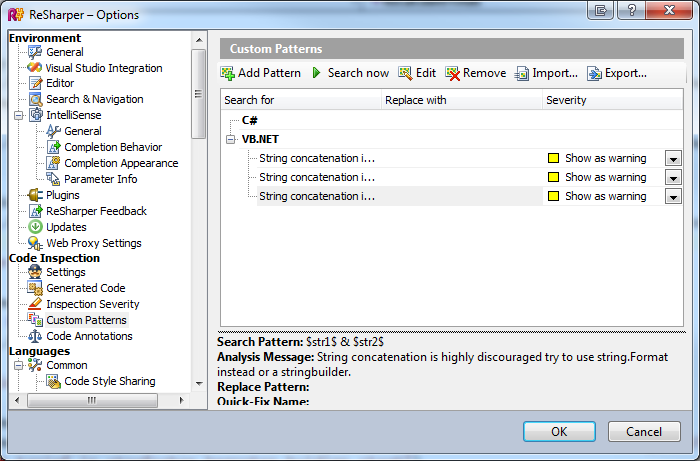
    And then you need to add a pattern. For which I got a little help.
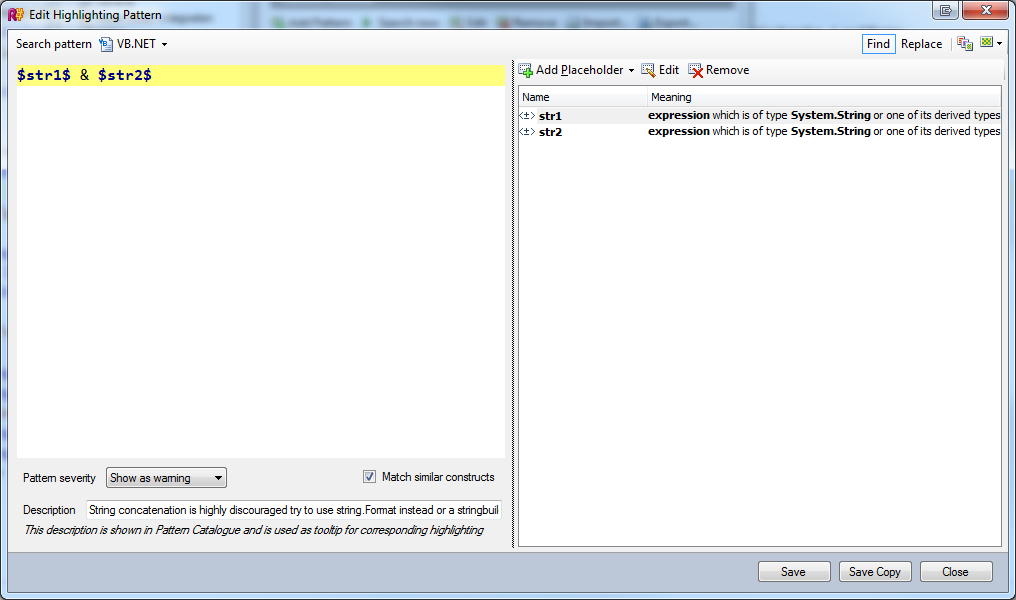
    Like I did the above. You can find more details on how to this at Hadi's place.

    So I'm looking for & with a string in front and behind it. str1 and str2 are placeholders of type expression and they should match System.String or derived type of that.

    Now when I do a search it will find all the concatenations in my code.
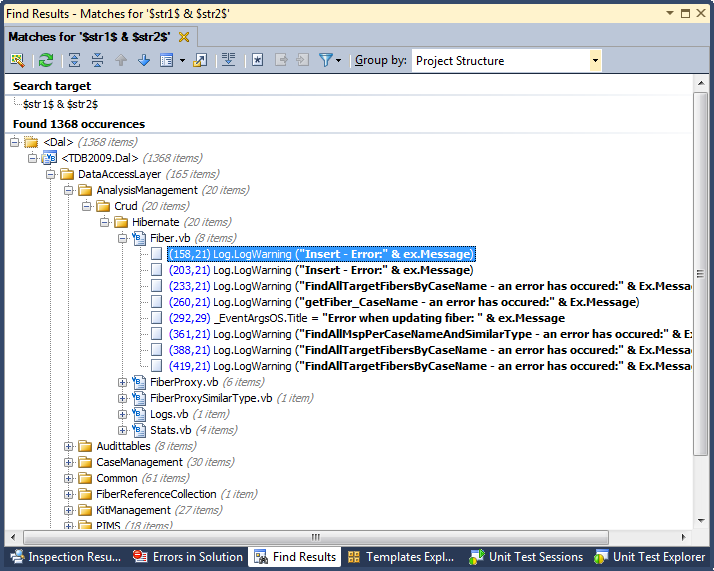
    But that is not all. As you can see above I also set the severity level to warning, so the resharper code inspection thing will now also show a blue squigly line and give me the message I typed in.

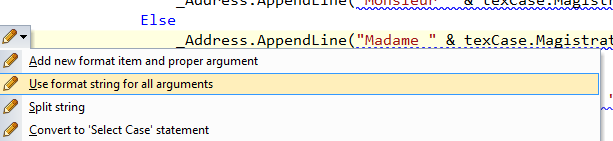
    And even better is that you can do Alt+Enter and have it fix it for you by choosing "Use format string for all arguments".

    and it goes from this.

    To this.

    In a matter of a second.

    Conclusion

    There are so many things we need to know and do but from time to time it is best to have tools to help us do our jobs better and faster. So use those tools. Of course learning those tools takes time and effort.

    About the Author

    User bio imageChris is awesome.
    Social SitingsTwitterHomePageLTD RSS Feed
    InstapaperVote on HN

    5 comments

    Comment from: Brian Lewis [Visitor] Email
    Brian Lewis I use String.Format almost exclusively for string concatenation, for the same reason you cited: it is clear what you're doing, and it is easy for you (and the next developer) to read.

    That having been said: I disagree with the overall premise that string concatenation is of itself "bad" because of the immutability of strings. I see NOTHING wrong with the example you gave:
        s5 = s1 & " " & s2 & " " & s3 & " " & s4
    other than the fact that it's hard to read. The "String Contatenation vs. Immutability" issue doesn't even come into play there.

    Only if you take that assignment and concatenate yet another value, like so:
        s5 = s5 & " plus one"
    does the immutability of strings affect concatenation, because you are taking s5 (which already has an immutable value), copying the contents from that memory location, building an entirely new string object with the concatenated value, and assigning it to a new memory location.

    On the one hand, I hate to focus on that small point, because your conclusion that we should favor String.Format over in-line concatenation is a good and valid practice. But at the same time, I am concerned that the pervasive oversimplification that "all concatenation is bad because strings are immutable in .NET" stands as a barrier to deeply understanding the tools we use.
    06/07/11 @ 19:16
    Comment from: Christiaan Baes (chrissie1) [Member]
    Christiaan Baes (chrissie1) I did not say "all concatenation is bad" I said "But it ain't all that simple why and when you want and need to use either of the two."

    But it's to complex to really describe when you should which option since it depends from case to case as you say. So I just say let's use String.Format for readability instead of the & thing. And when needed go to the Stringbuilder thing. I added those links because they explain it better than e and in the end I wanted to show the resharper thing.

    Hope that makes it clearer.
    06/08/11 @ 00:31
    Comment from: Mark Powell [Visitor] Email
    Mark Powell Have you considered String.Concat() or String.Join()?

    eg:

    s5 = String.Concat(s1, " ", s2, " ", s3, " ", s4);

    or better still:

    s5 = String.Join(" ", s1, s2, s3, s4);

    I would say the later is much clearer.

    I'm not a fan of seeing String.Format used to concatenate strings as there are specific functions in the framework for this function (and String.Format() is capable of so much more)

    I like the resharper aspect though :)
    06/18/11 @ 04:34
    Comment from: Jeff [Visitor]
    Jeff Even your proposed .AppendLine(string.Format(...)) line is very inefficient. You should use .AppentFormat().
    09/29/11 @ 22:24
    Comment from: Christiaan Baes (chrissie1) [Member]
    Christiaan Baes (chrissie1) @Jeff I see you missed the point. Sorry about that.
    09/30/11 @ 02:29

    Leave a comment


    Your email address will not be revealed on this site.

    To mislead the spambots.

    Your URL will be displayed.
    (Line breaks become <br />)
    (Name, email & website)
    (Allow users to contact you through a message form (your email will not be revealed.)