



The Microsoft reporting engine doesn’t seem to have a barcode control. So there are a few solutions to the problem.
- Using barcode fonts
Not an option for me since this is a winforms application and I don’t like to go around and install those fonts on every computer that needs it.
- Using a custom usercontrol
There are a couple of 3rd party products that claim to have this functionality. For example, Neodynamics and IDautomation. I tried the Neodynamics one but it needed a reference to Microsoft.reportviewer.design.dll, which I don’t have. But while going through Google I found How to add Barcode in Local Reports (RDLC) before report rendering stage – .NET Windows Forms Product List Sample with PDF & Excel and A Tutorial for Creating a RDLC (Report Definition Language Client-side) report in Visual Studio 2005⁄2008. Which gave me the idea that I could use my old winforms barcode control. It comes from J4L and is very cheap. I even think you could find other barcodecontrols out there for free like on the codeproject.
Now, let’s get started. First, I created a class library and put this class in it.
```vbnet Imports System.Drawing Imports System.IO
Public Class BarcodeControl
Public Shared Function MakeBarcode(ByVal Code As String) As Byte()
    Dim bmp As New Bitmap(1000, 500)
    Dim g As Graphics = Graphics.FromImage(bmp)
    Dim b As New J4L.RBarcode.Rbarcode1D()
    b.Code = Code
    b.BarType = J4L.RBarcode.Rbarcode1D.tbarType.BAR39
    b.paintBarcode(g)
    Dim ms As MemoryStream = New MemoryStream()
    bmp.Save(ms, Imaging.ImageFormat.Png)
    Dim bmpBytes As Byte() = ms.GetBuffer()
    bmp.Dispose()
    ms.Close()
    Return bmpBytes
End Function
End Class``` This class has references which are important to remember, namely System.Drawing and J4L.RBarcode.
Now let’s create a new windows forms project and add a form to it with the reportviewer on it.
Then we create a new report and we add an image to that. We should then change the following properties of that image.
First the MIMEType to image/png the sizing to FitProportional or Fit as you like. Source to Database (not sure why ;-)) and the Value to =RSBarcodeControl.BarcodeControl.MakeBarcode(“123”)
And that’s it. We can now change the Load event of our form with reportviewer to this.
vbnet
Me.ReportViewer1.LocalReport.ReportPath = Application.StartupPath & "Report1.rdlc"
Me.ReportViewer1.RefreshReport()
And run it.
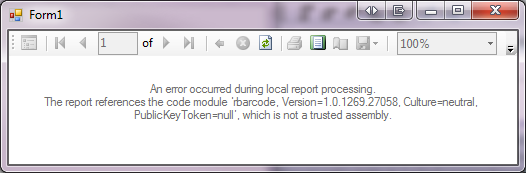
And get an errormessage.
An error occurred during local report processing. The report references the code module’…’, which is not a trusted assembly.
You can either sign them or make the trusted to the Localreport. Like this in the load event of our form:
vbnet
Me.ReportViewer1.LocalReport.ReportPath = Application.StartupPath & "Report1.rdlc"
      Me.ReportViewer1.LocalReport.AddTrustedCodeModuleInCurrentAppDomain("rbarcode, Version=1.0.1269.27058, Culture=neutral, PublicKeyToken=null")
        Me.ReportViewer1.LocalReport.AddTrustedCodeModuleInCurrentAppDomain("RSBarcodeControl, Version=1.0.0.0, Culture=neutral, PublicKeyToken=null")
        Me.ReportViewer1.LocalReport.AddTrustedCodeModuleInCurrentAppDomain("System.Drawing, Version=2.0.0.0, Culture=neutral, PublicKeyToken=b03f5f7f11d50a3a")
        Me.ReportViewer1.RefreshReport()
Now run it again and see the tiny, tiny barcode but it is scan-able.
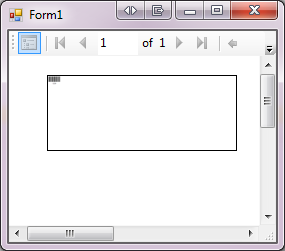
It needs some more work but you get the idea. Next stop would be to make this into a usercontrol that can be dragged and dropped onto the reportdesigner but for this I need the namespace Microsoft.ReportViewer.Design, which I don’t have because that is only installed with SSRS. So I guess I will need to workaround that somehow or install SSRS on this machine.
This should not only work in VS2008 with rdlc (local reports) but also on SSRS and BIDS adn rdl’s (see Ted, I remembered).
EDIT:
I just downloaded the new version of J4L’s barcode control and I noticed they added a few properties. So we can now do this:
vbnet
Dim bmp As New Bitmap(1000, 500)
        Dim g As Graphics = Graphics.FromImage(bmp)
        Dim b As New J4L.RBarcode.Rbarcode1D()
        b.Code = Code
        b.BarType = J4L.RBarcode.Rbarcode1D.tbarType.BAR39
        b.paintBarcode(g)
        bmp = New Bitmap(Convert.ToInt32(b.paintedWidth) + 2, Convert.ToInt32(b.paintedHeight) + 2)
        g = Graphics.FromImage(bmp)
        b.paintBarcode(g)
        Dim ms As MemoryStream = New MemoryStream()
        bmp.Save(ms, Imaging.ImageFormat.Png)
        Dim bmpBytes As Byte() = ms.GetBuffer()
        bmp.Dispose()
        ms.Close()
        Return bmpBytes
Which makes the bitmap the same size as the barcode.
 Chris is awesome.
