



This blog is part of my series Making Data Tell a Story With SSRS Properties.
Property: Background Image
The purpose of this property is to allow you to show an image in the background of a report, table, list, and more.
To access the property, go to Report, Body, Table, or Matrix properties and select Background Image.
The options are Source, Value, MIMEType, and BackgroundRepeat.

Source:
External – an image that can be accessed via a URL.
Embedded – an image that is part of the report definition.
Database – an image stored in a database, which is accessed through a dataset.
Value:
If External – the image URL.
If Embedded – the image name.
If Database – the dataset field that contains the image.
MIMEType: the image type – bmp, jpeg, gif, png, or x-png.
Background Repeat:
Repeat: both horizontal and vertical.
RepeatX: horizontal.
RepeatY: vertical.
Clip: image appears once, anchored in top left corner.
Example: I want to add my company logo as the background to a report.
Choose the Body properties. I select an embedded JPEG, set to clip.
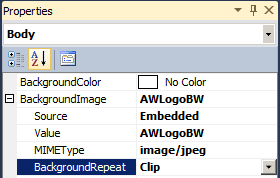
This is how the background image appears in Design mode:
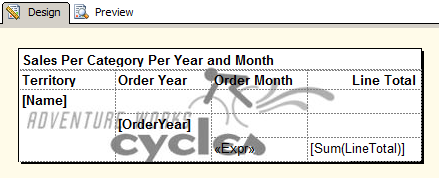
This is how the background image appears in Preview mode:

Other use cases for this have been putting the words "DRAFT" or "CONFIDENTIAL" as a watermark on reports.
Further Reading:
 Jes Borland is a Premier Field Engineer - SQL Server for Microsoft, where she is a trusted technical adviser, deep technical support, and teacher for her customers. Her experience as a DBA, consultant, and 5-time Data Platform MVP allow her to help the business and the IT teams reach their goals. She has worked with SQL Server as a developer, report writer, DBA, and consultant. Her favorite topics are administration, automation, and performance. She frequently presents at user groups, SQL Saturdays, and other community events. She is also an avid runner and chef.

