Login or Sign Up to become a member!
LessThanDot Sit Logo

LessThanDot

Data Management

Less Than Dot is a community of passionate IT professionals and enthusiasts dedicated to sharing technical knowledge, experience, and assistance. Inside you will find reference materials, interesting technical discussions, and expert tips and commentary. Once you register for an account you will have immediate access to the forums and all past articles and commentaries.

LTD Social Sitings

Lessthandot twitter Lessthandot Linkedin Lessthandot friendfeed Lessthandot facebook Lessthandot rss

Note: Watch for social icons on posts by your favorite authors to follow their postings on these and other social sites.

Your profile

    Search

    XML Feeds

    Google Ads

    « SQL Saturday New York City recapDo you use disable index or drop index when running your ETL processes in SQL Server »
    comments

    Scott Stauffer (blog | twitter) asked a question on #sqlhelp a few days ago and thought I’d go into actually doing an example on the task he was trying to accomplish.

    Below is a snapshot of the tweet.
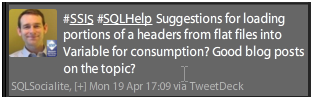
    My first thought was to throw in a script component to transformation. With each row input into the buffer the row could be parsed to validate the header. If the unique pattern in the string was found, then lock a variable and assign the value to it


    Let’s get some things out of the way


    The script component will read every row. That in itself will run slower than other methods such as directly importing without a transformation. This is the beauty of SSIS though and the 6 ways to do anything. In our situation we have, a script task in front of the data flow task could be utilized to grab the header and assign it to the variable while deleting it. This would be much more efficient.

    Special circumstances do call for methods that may perform slower at times to provide stability and validation processing. The reasoning for showing this method is to provide the validation on the rows from regular expressions and pattern matches. This will provide a higher amount of freedom on resources as well by reading the rows into the buffer and out. When methods such as the script task are used to modify flat files prior to imports, the entire file is pulled into memory and given some large imports, this can be a hardship to manage on mid-size servers.

    Let’s look at the two methods that are mentioned above. The first will be the script component to match the string value we need.

    Create a package named header_Split and the following supporting tables in your lab database

    1. CREATE TABLE [dbo].[header](
    2.     [Column 0] [varchar](50) NULL
    3. ) ON [PRIMARY]
    4. GO
    5. CREATE TABLE [dbo].[header_split](
    6.     [Column 0] [varchar](50) NULL
    7. ) ON [PRIMARY]
    8. GO


    Create a variable at the package scope level named, global.

    Our global connections for the package will be one flat file connection named, “importer” and an OLEDB connection named as the instance. Our flat file will contain the following text

    1. header <grab me> string
    2. test
    3. test
    4. test
    5. test


    Bring over a data flow task and let’s name it, “DF Flat File Pump”


    In the data flow task, bring over a flat file source and configure it to use our importer connection.

    Bring over a script component now and when the “Select Script Component Type” appears, select the “Transformation” option.


    In the Script Transformation Editor, select our one column (default: Column 0)

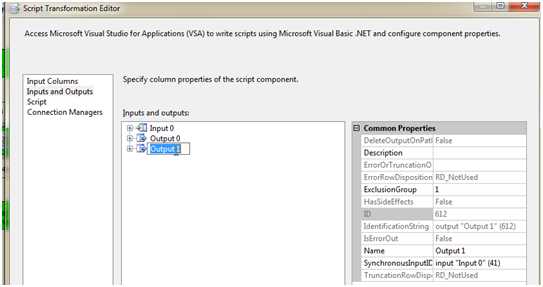
    Go into the, “Input and Outputs” window and select the output.

    If the names are all left as the defaults, the output will be titled, Output 0.

    Change the ExclusionGroup to 1.

    Add a new Output next, Output 1.

    In the new output change the ExclusionGroup group to 1 as well and set the SynchronousInputID to the Input 0 ID. This will be listed in the dropdown.

    Select the Script window and add into the ReadWriteVariables the variable, “global”

    Go into the studio by clicking the, “design Script” next.

    The code to perform the action is below. It will utilize Regular Expressions to first find the match to the unique value we need and then assign it to the variable global. In order to assign a variable in the script component without throwing Post Execute errors, we must lock the variable by using the VariableDispenser.LockOnForWrite function.

    1. Imports System
    2. Imports System.Data
    3. Imports System.Math
    4. Imports Microsoft.SqlServer.Dts.Runtime
    5. Imports Microsoft.SqlServer.Dts.Pipeline.Wrapper
    6. Imports Microsoft.SqlServer.Dts.Runtime.Wrapper
    7. Imports System.Text.RegularExpressions
    8.  
    9. Public Class ScriptMain
    10.     Inherits UserComponent
    11.  
    12.     Public Overrides Sub Input0_ProcessInputRow(ByVal Row As Input0Buffer)
    13.         If Regex.IsMatch(Row.Column0, "<[\w]{4}\s[\w]{2}>") Then
    14.             Dim mismatch As Match
    15.             Dim pattern As New Regex("<[\w]{4}\s[\w]{2}>")
    16.             mismatch = pattern.Match(Row.Column0)
    17.  
    18.             If mismatch.Length > 0 Then
    19.                 Dim var As IDTSVariables90
    20.                 Me.VariableDispenser.LockOneForWrite("global", var)
    21.                 var("global").Value = mismatch.Value
    22.                 var.Unlock()
    23.             End If
    24.             Row.DirectRowToOutput0()
    25.         Else
    26.             Row.DirectRowToOutput1()
    27.         End If
    28.     End Sub
    29.  
    30. End Class


    Drag and drop two OLEDB Destination’s into the data flow and rename them “data pump” and “headers”. We are only creating the headers destination for our testing purposes to validate the headers coming out and for later utilization if needed.

    Connect the Output 1 to the data pump destination and map the column to the column in the header_split table. Connect the Output 0 to the headers destination and map the output column to the one column in the header table then.

    Execute the package.
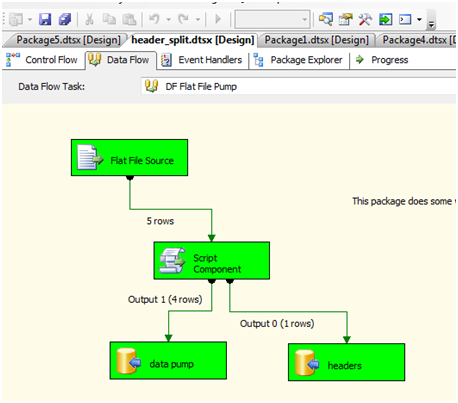
    The results are showing the output that we found as a header based on our regular expression pattern match flows to the headers destination. At the same time, the data we need flows to the data pump destination.


    Querying this in SSMS shows
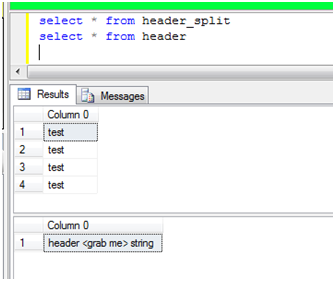
    The major problem with this process is the fact we are processing row by row while putting the row under a microscope. Imagine this in a 300M row import. It wouldn’t go very well but would go if needed.

    The next solution that will be much easier to implement, maintain and gain performance will follow in a second part to this post. We will utilize a script task to manipulate the file before hand, assign the variable, delete the header and import the data as needed.


    About the Author

    Ted Krueger is a SQL Server MVP and has been working in development and database administration for 13+ years. Specialties range from High Availability and Disaster / Recovery setup and testing methods down to custom assembly development for SQL Server Reporting Services. Ted blogs and is also one of the founders of LessThanDot.com technology community. Some of the articles focused on are Backup / Recovery, Security, SSIS and working on SQL Server and using all of the SQL Server features available to create stable and scalable database services. @onpnt
    Social SitingsTwitterLinkedInLTD RSS Feed
    1624 views
    Instapaper

    6 comments

    Comment from: StefBauer [Visitor] · http://www.stef-bauer.com
    StefBauer This is cool! ... I have a slight variation on the same problem, wanted to see if you have any thoughts.... The problem I have is an occasional "extra" cr/lf in the file which causes the line to wrap/split in unexpected places. The problem is that the file-reader is reading a row at a time, and those rows get split... any ideas on removing "extra" cr/lf's (leaving the correct one at the end of the row). (not a fixed width file... a delimited csv).
    04/22/10 @ 06:53
    Comment from: Scott Stauffer [Visitor] · http://www.sqlservertoolbox.com
    Scott Stauffer I like this solution, but I did come up with another that does quite similar without any scripting. I guess that means I have to get off my duff and blog about it and reference your blog. I am glad my question inspired a blog post. I think it would make sense to a have a robust component developed to help process flat file headers. This would seem like a great tool for enterprise ETL. I was hoping that there was already a tool. Your solution is great but to it would be nice to have a configurable solution in a task.
    04/22/10 @ 09:42
    Comment from: Ted Krueger (onpnt) [Member]
    Ted Krueger (onpnt) I agree with you Scott. I asked Jamie T. to take a look. It is very possible I am missing something obvious. It may exist and I missed it.

    Thanks for the great feedback!
    04/22/10 @ 09:47
    Comment from: genomon [Member]
    genomon Thanks onpnt! I forwarded a link to my supervisor, who has been struggling with this very issue. Can't wait for part two!
    04/23/10 @ 14:32
    Comment from: Ted Krueger (onpnt) [Member]
    Ted Krueger (onpnt) Wow, thanks genomon! Feedback like that is really why we keep going on sharing things like this :-)
    04/24/10 @ 09:17
    Comment from: genomon [Member]
    genomon "The next solution that will be much easier to implement, maintain and gain performance will follow in a second part to this post."

    Bring it on!
    Anxiously awaiting with bated breath...
    05/04/10 @ 10:15

    Leave a comment


    Your email address will not be revealed on this site.

    Your URL will be displayed.
    (Line breaks become <br />)
    (Name, email & website)
    (Allow users to contact you through a message form (your email will not be revealed.)