



This past weekend I made my first foray into SQL Azure. SQL Azure has been on my list of “to learn” technologies and lately it made it closer to the top. While I had picked up some knowledge from random links in the twitter-sphere, I hadn’t made a concerted effort to learn about it yet.
I started with a site named Microsoft Virtual Academy. This site (despite some usability issues with the dialog boxes prior to signup) offers a number of virtual “courses” that consist of links to external resources grouped into modules, each of which finishes with a short assessment. As I started working my way through the modules for SQL Azure it so happened that Brian Harry (blog) posted a link to a free Azure trial, which was handy since I no longer have an MSDN account (MSDN accounts are also offered a free trial, check out your subscription page for more information).
On top of this information it happened that Buck Woody (blog|twitter) posted up an even more extensive list of information on Azure technologies, so it looks like my to-learn list is going to be full for a while.
As if that flurry of links wasn’t enough, DeepFriedBytes posted a podcast with Buck Woody on the importance of cloud (ahem, distributed) technologies. If there is one link you follow-up on, make it that one.
My First Azure Database
I followed the instructions provided by the resources above to create my account, configure the firewall rules, and create my first database. But then I was stumped, what was I going to put in it?
It so happens that I’ve been working on an idea for a pet project for some time (well, one of many). In fact I had already used this idea to practice prototyping, requirements elicitation, and creation of an Agile-y product backlog. Some people knit, it never really caught on for me.

Prototype image 3 of 8
Not only that, but the act of coming up with user stories (potential features) forced me to invent a common terminology and recognize which terms were coming up the most frequently.

70+ User Stories/Features
So I might have enough information to put together a normalized database to support the core functionality, which is about as close as I am going to get to a realistic data model on a Sunday evening.
Creating the Database
Creating the first database was fairly straightforward (video) and consisted of setting up my subscription, creating a new server, and then creating the database. The main interface uses Silverlight, so unfortunately I wasn’t able to use my [insert tablet here] (the future is here?). After the initial database ‘server’ was setup, I switched over to SSMS to actually build out my data model.
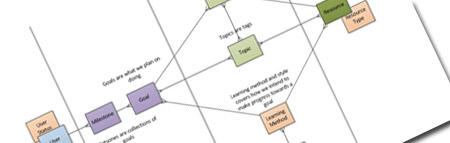
I Also Drew A Data Model...with Color (Oooo)
The first step was to add my database to SSMS. As I already have 2008 RS on my local machine, this was fairly straightforward. I clicked the “Connect” button in SSMS, entered the full server name from the Azure interface (right toolbar after creating “Server”) and the credentials I had created as part of setting up the database “Server”. Voila, it’s that easy. The database server is connected, but instead of the usual yellow cylinder I get this nifty new  icon.
icon.
Now that I was connected I right-clicked to wizard my way through database creation only to find myself staring at a new script window. Unfortunately the GUI capabilities for Azure databases are limited and many times in mousing my way around the GUI I found myself staring at unexpected script windows, which was a little disconcerting and showed me how dependent I had grown towards the interface.
Creating my database, I found that nearly all of the work was done through scripts instead of the usual GUI windows. Attempting to create the database or tables in the GUI generated a script with a SQL snippet to help me out. Luckily I knew well enough to include indexes on each of my tables (Azure requires each table have a clustered index), so this part went smoothly.
What I hadn’t counted on was how ingrained the usage of the IDE had become. Twice I accidentally left off IDENTITY’s that I had intended to write, and both times I found it easier to drop and recreate the table from scratch. Attempting to script the table from SSMS (Right click, Script Table As, aww no “Alter”, OK then “Create”) resulted in the usual CREATE TABLE command being scripted, including some options that aren’t available in Azure.
Despite some hiccups, however, I was able to build out my entire data model in an hour. Considering I was having to polish some rusty skills along the way and had never touched Azure before, this seems fair.
What’s Next
Now that I have a database, I’m tempted to use it. Continuing plans include building a sample application to talk to this database, playing with some fail over options, and generally trying out this whole SQL (and Windows) Azure technology. So far I’ve found the technology to be remarkably easy to start using, lets see if that continues to be true.
I suspect having missed the distributed computing course in college, this will all get much trickier at some random point in the future.
And now go click that DeepFriedBytes link up top and listen to Buck, you’ll thank me.
 My roles have included accidental DBA, lone developer, systems architect, team lead, VP of Engineering, and general troublemaker. On the technical front I work in web development, distributed systems, test automation, and devop-sy areas like delivery pipelines and integration of all the auditable things.


