



For my part-time job I was tasked with the job to create an instance of Reporting Services that is accessible from the internet. After about a month of trial and error, I was able to get the set up to work. However, I didn’t save any of the configuration settings or links that I used while setting it up, so I’m very fuzzy on the details of what I did.
However, here’s a rough idea of what I did and a rough design of how the network is set up (this is by no means best practices).
This is a basic picture of the network
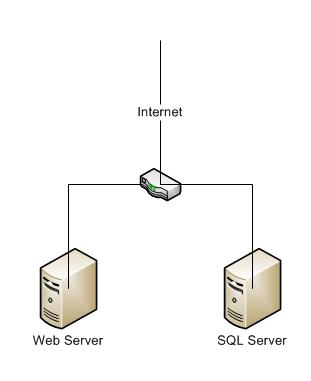
The router is set up as a firewall. All incoming http traffic is being directed to the web server.
The database server has SQL Server 2005 sp3 installed, as well as a local instance of Reporting Services.
You don’t want internet traffic to be able to reach your db server, and best practices says that the database server should be behind another firewall. So keep that in mind if you intend to do something like this.
On the web server I installed another instance of Reporting Services (no database engine). I then went into the configuration files and disables Report Server, but let Report Manager (the web front end) to stay up. I also set up Report Manager to forward to the Report Manager on the database server. One of the major caveats that I ran into at this point was that the IIS pools need to be recycled. For some reason it wasn’t working through the command prompt, but restarting the server did the trick.
We don’t have AD set up on this network, so I created a local user on both the web server and db server and denied it all access on the operating system. But in the IIS website for ssrs I forced the authentication to be the user for anyone accessing the SSRS instance online. I then used that user to forward authentication to the db server, where again the user doesn’t have any access to the local os.
On SSRS on the db server I denied the user all rights except to browse. The reports are set up with SQL Server authentication so that whenever a report is viewed they have to enter a username and password. This login has very stict rights on the sql server.
Sorry for the lack of details. If you have any questions feel free to ask and I will do my best to answer them.
This is one of the articles that I used while setting up.
