



People have been asking for sequences for a very long time and now finally it is included with SQL Server Denali CTP 1. You don’t have to muck around with an identity table that you share across many tables anymore.
A simple sequence will look like this
CREATE SEQUENCE GlobalCounter
    AS INT
    MINVALUE 1
    NO MAXVALUE
    START WITH 1;
GO
To get the next value from the sequence you would do something like this
SELECT NEXT VALUE FOR GlobalCounter -- 1

SELECT NEXT VALUE FOR GlobalCounter -- 2
As you can see, the value gets incremented by one.
Now we will create a table and instead of using an identity, we will use the sequence as a default
CREATE TABLE bla (id INT DEFAULT NEXT VALUE FOR GlobalCounter)
Insert some data into the table, one row will use the default, the other row will call the sequence
INSERT bla DEFAULT VALUES  --3

INSERT bla VALUES(NEXT VALUE FOR GlobalCounter)  --4
Now let’s see what is in the table, should be 3 and 4
SELECT * FROM bla --3,4
Here is one more example, this one will show you what happens when you reach the maximum value and how to reset it
CREATE SEQUENCE GlobalCounterTest
    AS BIGINT
    MINVALUE 1
    MAXVALUE 2
    START WITH 1;
GO
These two statements will succeed
SELECT NEXT VALUE FOR GlobalCounterTest --1
	SELECT NEXT VALUE FOR GlobalCounterTest --2
this one will fail
SELECT NEXT VALUE FOR GlobalCounterTest --error
Here is the error message
_Msg 11728, Level 16, State 1, Line 1
The sequence object ‘GlobalCounterTest’ has reached its minimum or maximum value. Restart the sequence object to allow new values to be generated._
To reset a sequence, you need to use restart
ALTER SEQUENCE GlobalCounterTest RESTART
GO
Let’s take a look at another example, this sequence will generate values 1 and 2 and will restart once you reach the max, this is accomplished by using cycle
CREATE SEQUENCE MySequence
 MINVALUE 1
 MAXVALUE 2
 CYCLE
Now run these 4 statements and you will see 2 rows with the vale 1 and two rows with the value 2
select NEXT VALUE FOR MySequence  --1
 select NEXT VALUE FOR MySequence  --2
 select NEXT VALUE FOR MySequence  --1
 select NEXT VALUE FOR MySequence  --2
You can also use the tinyint data type
CREATE SEQUENCE TinySequence
    AS TINYINT
    MINVALUE 1
    NO MAXVALUE
    START WITH 1;
Of course tinyint can only hold values up to 255, so if you run this in SSMS
select NEXT VALUE FOR TinySequence
GO 256
_Msg 11728, Level 16, State 1, Line 1
The sequence object ‘TinySequence’ has reached its minimum or maximum value. Restart the sequence object to allow new values to be generated._
One more example, if you create a sequence like this without specifying a start value, it will start at -2147483648 for an integer
CREATE SEQUENCE TestSequence
NO MAXVALUE;

select NEXT VALUE FOR TestSequence
output
————
-2147483648
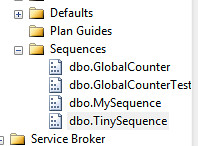
If you navigate to the sequence folder and right click on a sequence and then select properties you will see the following image
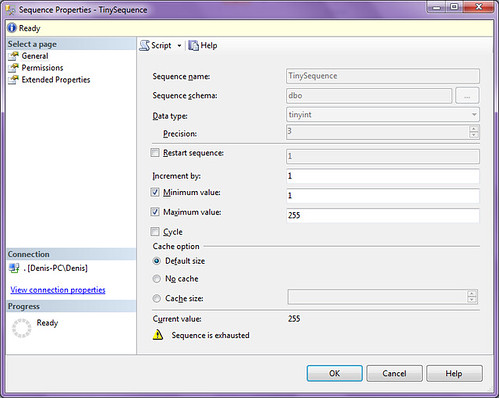
From here you can change the sequence and you can also create scripts by clicking on the script icon
Click on the SQL Server Denali tag to see all our SQL Server Denali related posts
 Denis has been working with SQL Server since version 6.5. Although he worked as an ASP/JSP/ColdFusion developer before the dot com bust, he has been working exclusively as a database developer/architect since 2002. In addition to English, Denis is also fluent in Croatian and Dutch, but he can curse in many other languages and dialects (just ask the SQL optimizer) He lives in Princeton, NJ with his wife and three kids.

