



It was a little remark from Bob Beauchemin (B|T) during the Belgian SQL Server Days that started me writing this post.
Showing cached Execution Plans
In this post I’m going to use information from the following Dynamic Management Views and Functions to show some information about the cached Execution Plans of the queries used in this post:
- sys.dm_exec_cached_plans shows types, usage, size… of the Execution Plans;
- sys.dm_exec_sql_text shows the actual code of the query;
- sys.dm_exec_query_plan is used to get the XML Execution Plan itself.
In fact I use following query to get the results:
SELECT cp.objtype, cp.cacheobjtype, cp.usecounts, cp.size_in_bytes, st.[text], qp.query_plan
	FROM sys.dm_exec_cached_plans cp
	CROSS APPLY sys.dm_exec_sql_text(cp.plan_handle) st
	CROSS APPLY sys.dm_exec_query_plan (cp.plan_handle)qp;
The result set of this query looks like this:
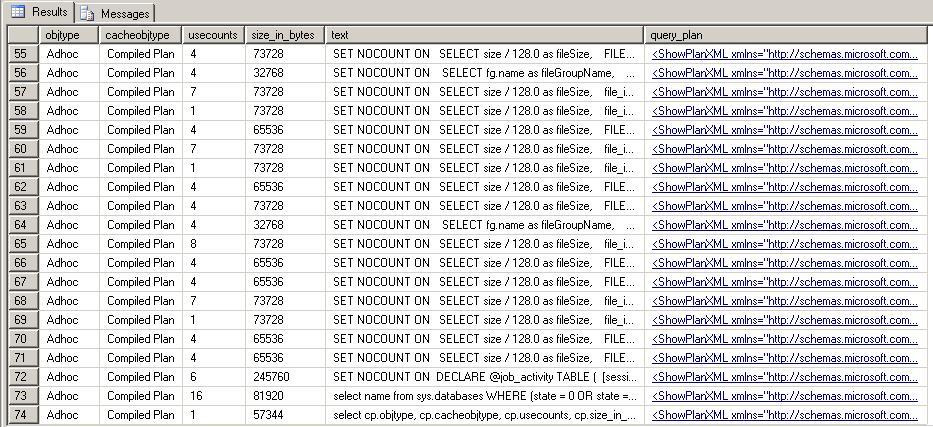
The result set can contain thousands of rows, depending on the uptime of the server, the number of queries and their corresponding execution plans, the available buffer memory…
IF using 2 code blocks
So let’s create a simple Stored Procedure that executes against the AdventureWorks2008R2 database:
USE AdventureWorks2008R2;
GO

CREATE PROCEDURE TwoPlans
	@IfParameter int
AS
	SET NOCOUNT ON;
	IF @IfParameter = 1
		SELECT a.City, COUNT(bea.AddressID) EmployeeCount
		FROM Person.BusinessEntityAddress bea
			INNER JOIN Person.Address a
				ON bea.AddressID = a.AddressID
		GROUP BY a.City
		ORDER BY a.City
	ELSE
		SELECT DATEPART(yyyy,OrderDate) AS N'Year'
			,SUM(TotalDue) AS N'Total Order Amount'
		FROM Sales.SalesOrderHeader
		GROUP BY DATEPART(yyyy,OrderDate)
		ORDER BY DATEPART(yyyy,OrderDate);
GO
The results of the query aren’t important what is important is to see what happens in the Procedure Cache. To be able to see what’s happening we are going to empty the procedure cache:
WARNING: executing the following code deletes all cached plans from the Procedure Cache. All Execution Plans need to be recompiled. This can result in a slow or unresponsive server.
DON’T EXECUTE THE FOLLOWING CODE ON A PRODUCTION SERVER!!!
DBCC FREEPROCCACHE;
GO
When you execute our first query again:
SELECT cp.objtype, cp.cacheobjtype, cp.usecounts, cp.size_in_bytes, st.[text], qp.query_plan
	FROM sys.dm_exec_cached_plans cp
	CROSS APPLY sys.dm_exec_sql_text(cp.plan_handle) st
	CROSS APPLY sys.dm_exec_query_plan (cp.plan_handle)qp;
You can see in the result set that only the Execution Plan from the above query is stored in the Procedure Cache.

Now execute the stored procedure:
EXEC TwoPlans 1;
GO
Execute the query against the Procedure Cache again:
SELECT cp.objtype, cp.cacheobjtype, cp.usecounts, cp.size_in_bytes, st.[text], qp.query_plan
	FROM sys.dm_exec_cached_plans cp
	CROSS APPLY sys.dm_exec_sql_text(cp.plan_handle) st
	CROSS APPLY sys.dm_exec_query_plan (cp.plan_handle)qp;
The result set shows us the execution of the above query with a usecount of 2 and the Execution Plan of our Stored Procedure:

Now click the XML link in the query_plan column. A new tab will open in SSMS showing you the XML Execution Plan:

You can now read the XML plan and you will find both the statements in the query plan:
ShowPlanXML xmlns="http://schemas.microsoft.com/sqlserver/2004/07/showplan" Version="1.1" Build="10.50.2500.0">
<BatchSequence>
<Batch>
<Statements>
<StmtSimple StatementText="CREATE procedure TwoPlans
	@IfParameter int
as
	SET NOCOUNT ON;
" StatementId="1" StatementCompId="3" StatementType="SET ON/OFF" />
<StmtCond StatementText="	If @IfParameter = 1
	" StatementId="2" StatementCompId="4" StatementType="COND">
<Condition />
<Then>
<Statements>
<StmtSimple StatementText="	SELECT a.City, COUNT(bea.AddressID) EmployeeCount
		FROM Person.BusinessEntityAddress bea 
			INNER JOIN Person.Address a
				ON bea.AddressID = a.AddressID
		GROUP BY a.City
		ORDER BY a.City
" StatementId="3" StatementCompId="5" StatementType="SELECT" StatementSubTreeCost="0.604708" StatementEstRows="574.696" StatementOptmLevel="FULL" QueryHash="0x03E92D79FC617C86" QueryPlanHash="0xED13B89036D1A5E6" StatementOptmEarlyAbortReason="GoodEnoughPlanFound">
<StatementSetOptions QUOTED_IDENTIFIER="true" ARITHABORT="true" CONCAT_NULL_YIELDS_NULL="true" ANSI_NULLS="true" ANSI_PADDING="true" ANSI_WARNINGS="true" NUMERIC_ROUNDABORT="false" />
<QueryPlan CachedPlanSize="32" CompileTime="7" CompileCPU="7" CompileMemory="344">...
</StmtSimple>
</Statements>
</Then>
<Else>
<Statements>
<StmtSimple StatementText="	Else
		SELECT DATEPART(yyyy,OrderDate) AS N'Year'
			,SUM(TotalDue) AS N'Total Order Amount'
		FROM Sales.SalesOrderHeader
		GROUP BY DATEPART(yyyy,OrderDate)
		ORDER BY DATEPART(yyyy,OrderDate);
" StatementId="4" StatementCompId="8" StatementType="SELECT" StatementSubTreeCost="0.780189" StatementEstRows="4" StatementOptmLevel="FULL" QueryHash="0xA73814A2D4649412" QueryPlanHash="0x7A5BDE1102728DAA" StatementOptmEarlyAbortReason="GoodEnoughPlanFound">...
</Statements>
</Else>
</StmtCond>
</Statements>
</Batch>
</BatchSequence>
</ShowPlanXML>
An easier trick to see the Graphical Execution Plans is to open SQL Sentry Plan Explorer and copy the XML into the Plan XML tab:
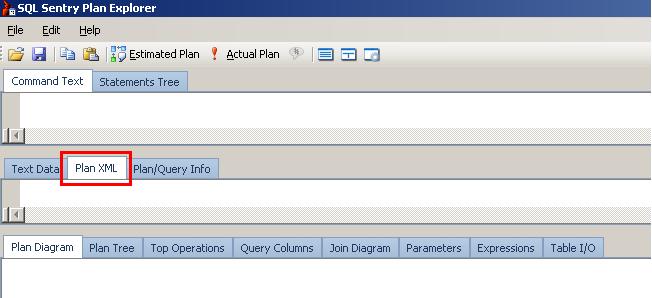
After doing this SQL Sentry Plan Explorer will give you all the details about the Execution Plan and you’ll see in the Plan Diagram that SQL Server created an Execution Plan for both the queries altough only the first one was used:

IF calling 2 Stored Procedures
Now let’s create 2 Stored Procedures that each will execute 1 part of the code from the previous query:
CREATE PROCEDURE EmpCntCity
AS
	SET NOCOUNT ON;
	SELECT a.City, COUNT(bea.AddressID) EmployeeCount
	FROM Person.BusinessEntityAddress bea
		INNER JOIN Person.Address a
			ON bea.AddressID = a.AddressID
	GROUP BY a.City
	ORDER BY a.City;
GO

CREATE PROCEDURE OrderAmountYear
AS
	SET NOCOUNT ON;
	SELECT DATEPART(yyyy,OrderDate) AS N'Year'
		,SUM(TotalDue) AS N'Total Order Amount'
	FROM Sales.SalesOrderHeader
	GROUP BY DATEPART(yyyy,OrderDate)
	ORDER BY DATEPART(yyyy,OrderDate);
GO
Next we create a Stored Procedure that will contain the IF…ELSE logic and based on the input parameter will execute one of the above Stored Procedures:
CREATE PROCEDURE TwoProcs
	@IfParameter int
AS
	SET NOCOUNT ON;
	IF @IfParameter = 1
		EXEC EmpCntCity
	ELSE
		EXEC OrderAmountYear;
GO
Now we can call our Stored Procedure and execute 1 of the Stored Procedures:
EXEC TwoProcs 1;
GO
Let’s again query the Procedure Cache:
SELECT cp.objtype, cp.cacheobjtype, cp.usecounts, cp.size_in_bytes, st.[text], qp.query_plan
	FROM sys.dm_exec_cached_plans cp
	CROSS APPLY sys.dm_exec_sql_text(cp.plan_handle) st
	CROSS APPLY sys.dm_exec_query_plan (cp.plan_handle)qp;
And have a look at the result:

Now we see that executing the second Stored Procedure also created 2 Executions Plans: 1 for the Stored Procedure “TwoProcs” and one for the Stored Procedure “EmpCntCity” that was effectively executed. But we see that there was no Execution Plan created for the Stored Procedure “OrderAmountYear”. And this Execution Plan was more complex than the Execution Plan of our “TwoProcs” Stored Procedure. We can also see that the sum of the sizes of the 2 Execution Plans (65536 + 16384 = 81920) is still smaller than the Execution Plan of the “TwoPlans” Stored Procedure (98304).
Conclusion
Avoid Stored Procedures that contain complete code blocks encapsulated in IF…ELSE or CASE blocks. It will result in SQL Server creating Execution Plans for all possibilities, consuming more Buffer Cache (memory) and in the end slow down the execution of the code.
As a bonus, troubleshooting the individual Stored Procedures will be much easier and there is a bigger chance that you can reuse the Stored Procedures.
 After 12 years as a MS SQL Server consultant and trainer, Axel is now using his data knowledge to implement "Product Information Management" solutions. These implementations are usually but not always linked to E-commerce projects.

