



When working with different database systems you have to be aware that some things work differently from one system to another. I already blogged a couple of times about differences between SQl Server and Oracle, those post are the following
Truncate rollback differences between SQL Server and Oracle
Differences between Oracle and SQL Server when working with NULL and blank values
An Oracle NULL/Blank gotcha when coming from SQL Server.
Today we are going to look at the difference between a unique index in Oracle and in SQL Server.
Let’s start with SQL Server. First create this table and also this index
CREATE TABLE TestUnique (Id int)


CREATE UNIQUE INDEX SomeIndex ON TESTUNIQUE (ID);
Insert the following two rows
INSERT INTO TestUnique VALUES(1);
INSERT INTO TestUnique VALUES(null);
Now let’s insert one more NULL
INSERT INTO TestUnique VALUES(null);
Here is the error
_Msg 2601, Level 14, State 1, Line 1
Cannot insert duplicate key row in object ‘dbo.TestUnique’ with unique index ‘SomeIndex’. The duplicate key value is (
The statement has been terminated._
As you can see you can only have one NULL value in the table
What about Oracle? Let’s take a look. Run this whole block, it will create a table, a unique index and will insert the same data
CREATE TABLE TestUnique (Id int);

CREATE UNIQUE INDEX INDEX1 ON TESTUNIQUE (ID);

INSERT INTO TestUnique VALUES(1);
INSERT INTO TestUnique VALUES(null);
INSERT INTO TestUnique VALUES(null);

SELECT * FROM TestUnique;
Here is what it looks like from SQL developer
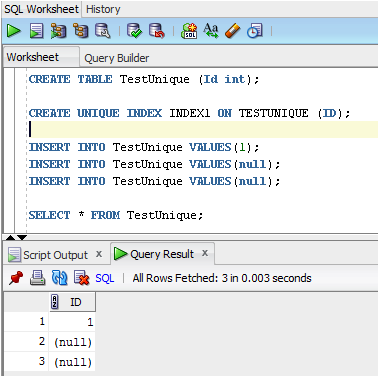
As you can see SQL Server only allows one NULL value while Oracle allows multiple NULL values. You have to be aware of these differences otherwise you might get unintended behavior from your programs
If you try to insert the value 1 again, you will get the following error
Error report:
SQL Error: ORA-00001: unique constraint (SYSTEM.INDEX1) violated
00001. 00000 -  "unique constraint (%s.%s) violated"
*Cause:    An UPDATE or INSERT statement attempted to insert a duplicate key.
           For Trusted Oracle configured in DBMS MAC mode, you may see
           this message if a duplicate entry exists at a different level.
*Action:   Either remove the unique restriction or do not insert the key.
Come back tomorrow to see how you can create an index in SQL Server that will allow multiple NULL values. You can find that post here: Creating a SQL Server Unique Index that behaves like an Oracle Unique Index
 Denis has been working with SQL Server since version 6.5. Although he worked as an ASP/JSP/ColdFusion developer before the dot com bust, he has been working exclusively as a database developer/architect since 2002. In addition to English, Denis is also fluent in Croatian and Dutch, but he can curse in many other languages and dialects (just ask the SQL optimizer) He lives in Princeton, NJ with his wife and three kids.

