



Introduction
So I thought I needed redis to do some much needed caching for an app I am writting. And I was right, as I often am.
So I installed redis and used the .net redis client from the always brilliant Demis Bellot.
Redis is a key-value database, a dictionary on steroids. It is great for caching. And it is fast at what it does by keeping most things in memory.
Redis
First I used the windows version of redis and that even worked, but it is not production ready. So I decided to install a linux VM with redis on it.
I downloaded mint 14 and did apt-get install redis-server. Then you need to change the file in /etc/res/redis.conf and comment the line bind 127.0.0.1 or change it to bind 0.0.0.0.
I used VMWare workstation 8 and I had to use NAT translation for the network and add forward the 6379 port.
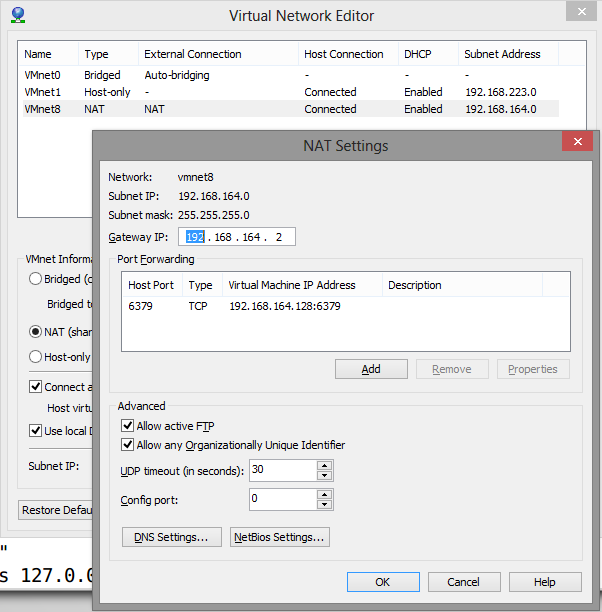
you can check if your redis server works by doing redis-cli ping on the server. This should return PONG. To be sure the binding works you should try redis-cli -h ipaddress ping. where you change ipaddress with the ip-address of the linux machine. This should also give PONG.
You can now do the same on the host to check if you can connect.
If all works well you can start writing to your redis server. And we might do some reading to.
Redis-client
Here is our model.
Public Class Mandate
        Public Property Id As String
        Public Property Version As Integer
        Public Property Name As String
    End Class```
Firstly you need to nuget servicestack.redis.

The following code writes some entries to our redis server.

```vbnet
Using redisClient = New RedisClient(ipaddressofthelinuxvm)
            Dim client = redisClient.As(Of Mandate)()
            client.GetAllKeys().Count.PrintDump()
            For i As Integer = 1 To 500
                client.SetEntry(i, New Mandate() With {.Id = i, .Version = 1, .Name = "Name" & i})
            Next
            Dim mandate5 = client.GetValue(5)
            mandate5.Version += 1
            client.SetEntry(5, mandate5)
            client.GetValue(5).PrintDump()
            client.GetAllKeys().Where(Function(x) Not x.Contains("ids")).Count.PrintDump()
            client.Save()
        End Using
        Console.ReadLine()
If you run the above you will get.
{
Id: 5,
Version: 2,
Name: Name5
}
500
On a second run you will get.
501
{
Id: 5,
Version: 2,
Name: Name5
}
500
So I add 500 objects but it tells me I have 501. The 501st is the id of the mandate class.
I don’t really need to do the save, since redis will do an autosave every so often (depends on your redis.conf).
Conclusion
It is here that I pretend that redis is easy to use and to set up. And it is, just not for me ;-).
I would like to thank Demis for setting me on the way to solving my connectivity problems with the VM.
The second time it won’t add another 500 entries, it will update the ones that are there.
 Chris is awesome.
