



Pivoting and Unpivoting data has been one of the parts of tsql that has been eluding my grasp for a while now. I’ve seen plenty of examples for both of these, but none of those examples really helped me in understanding exactly what’s going on. We have a wiki article for each here on LTD, Pivot and Unpivot,
but again these don’t tell me a whole lot about what’s going on, just the before and after pictures. Well, I was messing around with the unpivot code the other day, and how it worked finally dawned on me. So, I would like to share what I learned.
At my part time job, we were working on a Workforce Availability study. As part of the study, we hired out to a phone survey company. We created a survey script for their callers and gave it to them. The company made a lot of phone calls and when all was said and done they provided us with a spreadsheet of the answers. Needless to say this spreadsheet was in no way normalized for data import. It looked a something like this:
declare @survey table (Respondent int identity(1,1), Q1 int, Q2 int, Q3 int, Q4 int, Q5 int)

insert into @survey values (1,3,1,5,8)
insert into @survey values (2,4,1,6,8)
insert into @survey values (1,4,1,7,9)
insert into @survey values (2,3,2,6,9)
insert into @survey values (1,3,1,5,10)

select * from @survey
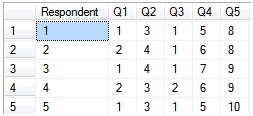
Well, right now that’s a decent sized mess to clean up using union alls. However, we don’t have to make that big mess thanks to unpivot. Here’s what the unpivot code looks like.
select
	Respondent,
	Q,
	A
from @survey
unpivot
(
	A for Q in (Q1, Q2, Q3, Q4, Q5)
) as u
The way this works is in the unpivot statement, the A for Q statement breaks apart each column you list in the in statement. So for columns Q1, Q2, Q3, Q4, and Q5, the unpivot function breaks it apart, putting the column name in Q, and putting the actual value into A.
Now that the data’s normalized we can join to it rather easily.
declare @survey table (Respondent int identity(1,1), Q1 int, Q2 int, Q3 int, Q4 int, Q5 int)
declare @questions table (PK_quID int identity(1,1), quName varchar(255))
declare @answers table (PK_anID int identity(1,1), anName varchar(255))

insert into @questions values ('Do you have a drivers license?')
insert into @questions values ('What best describes your current employment conditions?')
insert into @questions values ('Do you have hair?')
insert into @questions values ('What kind of vehicle do you drive?')
insert into @questions values ('What state are you from?')
insert into @answers values ('yes')
insert into @answers values ('no')
insert into @answers values ('working')
insert into @answers values ('not working')
insert into @answers values ('car')
insert into @answers values ('truck')
insert into @answers values ('suv')
insert into @answers values ('MO')
insert into @answers values ('IL')
insert into @answers values ('TN')
insert into @survey values (1,3,1,5,8)
insert into @survey values (2,4,1,6,8)
insert into @survey values (1,4,1,7,9)
insert into @survey values (2,3,2,6,9)
insert into @survey values (1,3,1,5,10)


select
	s.*,
	qu.*,
	an.*
from
(
	select
		Respondent,
		right(Q,1) as Q,
		A
	from @survey
	unpivot
	(
		A for Q in (Q1, Q2, Q3, Q4, Q5)
	) as u
) s
	left outer join @questions qu
		on s.Q=qu.PK_quID
	left outer join @answers an
		on s.a = an.PK_anID
Well, seeing as my data is now normalized I can put it into my responses table.
declare @responses table (Respondent int, FK_quID int, FK_anID int)

insert into @responses
(
	Respondent,
	FK_quID,
	FK_anID
)
select
	Respondent,
	right(Q,1) as Q,
	A
from @survey
unpivot
(
	A for Q in (Q1, Q2, Q3, Q4, Q5)
) as u
Alright, now I’ve got my survey data stored and I want to run some analytics. One of the ways to analyze the data is to run a crosstab off of the data. Here’s a crosstab using pivot:
select
*
from
(
	select
		Respondent,
		quName,
		anName
	from @responses r
		inner join @questions q
			on r.FK_quID=q.PK_quID
		inner join @answers a
			on r.FK_anID=a.PK_anID
) a
pivot
(
	count(a.Respondent)
	for anName in
		(
			[yes],
			[no],
			[working],
			[not working],
			[car],
			[truck],
			[suv],
			[MO],
			[IL],
			[TN]
		)
) as pvt
In this I’m joining my response table to my questions and answers table in a subquery. I then pivot all of that data using the pivot function. The pivot function takes an aggregate and applies that across the columns and rows. In this example, I specify count(a.Respondent) as my aggregate, and then I specify that I want that across anName (and I provide a list of values that I want it applied to) on the X axis. Unpivot then takes the last column and applies that to the Y column, and then applies the aggregate data to any pieces of that that match up on the X and Y axis.

So, in the entire survey, three respondents answered yes to having a driver’s license, while two answered no, four answered as having hair while one answered no.
If you remove quName from the subquery, pivot doesn’t have a third data point to aggregate the data to, so it’ll just aggregate to the X axis.

You can play with the aggregate in the query a little bit. If you change it to avg, it’ll average all the respondent ids. If you change it to min, it’ll show you which respondent provided each answer for each question first.
