


Login or Sign Up to become a member!
LessThanDot Sit Logo

LessThanDot

Data Management

Less Than Dot is a community of passionate IT professionals and enthusiasts dedicated to sharing technical knowledge, experience, and assistance. Inside you will find reference materials, interesting technical discussions, and expert tips and commentary. Once you register for an account you will have immediate access to the forums and all past articles and commentaries.

LTD Social Sitings

Lessthandot twitter Lessthandot Linkedin Lessthandot friendfeed Lessthandot facebook Lessthandot rss

Note: Watch for social icons on posts by your favorite authors to follow their postings on these and other social sites.

Your profile

    Search

    XML Feeds

    Google Ads

    « Have SQL, will travel – East Iowa SQL SaturdaySQL Saturday Iowa »
    comments

    Today, I came across a question in MSDN forums “How to pick 5 random records?”. In SQL Server the only consistent way I know is to use NEWID() function in the Order By Clause.

    1. select top 5 * from Orders  order by NEWID()

    This approach will always scan the entire table irrespective of number of rows requested. It retrieves each record in the table, appends a new GUID for each row, then based on that GUID it sorts the rows and presents the top 5 rows. Disadvantage here is it scans the entire table (if it’s heap) or Clustered Index.

    After thinking for a while, I got an idea; If the table has a Unique column and its covered by an index, we can use that column to select the required random records and then join it with the table. This is going to improve performance.
    Assume a table “Orders” with an index on column “OrderId”. In order to pick 5 random rows, we can write query like this.

    1. ;with cte as
    2. (
    3.     select top 5 OrderID from Orders  order by NEWID()
    4. )
    5. select  t.* from cte c
    6. inner join Orders t on t.OrderID = c.OrderID

    The Inner CTE will use the index and pick the 5 random orders and outer query will get the details of those 5 random rows. By picking just the OrderIDs in CTE, we avoid the scanning of entire table. In the outer query, SQL optimizer will get the details of those rows by using lookups.

    The Table we used for testing,has around 1,80,000 records. Has an Clustered index and Non-Clustered Index on the Column. For Both indexes, the only common column is "ID". The size of these indexes is listed below.

    1. select index_type_desc,index_level,page_count from sys.dm_db_index_physical_stats(DB_ID(),object_id('Issues'),null,null,'detailed')


    index_type_descindex_levelpage_count
    CLUSTERED INDEX09899
    CLUSTERED INDEX125
    CLUSTERED INDEX21
    NONCLUSTERED INDEX0305
    NONCLUSTERED INDEX11

    Clustered Index occupied total 9925 Pages across the 3 Levels

    Non Clustered Index occupied total 306 Pages across the 2 Levels

    Here are the executed queries

    1. -- Non CTE Version
    2. SELECT TOP 5 * FROM Issue_Dump  ORDER BY NEWID()
    3.  
    4. -- CTE Version
    5. ;with cte AS
    6. (
    7.     SELECT TOP 5 [CR ID] FROM Issue_Dump  ORDER BY NEWID()
    8. )
    9. SELECT  t.* FROM cte c
    10. INNER join Issue_Dump t ON t.[CR ID] = c.[CR ID]

    Below are the recorded statistics

    QueryLogical ReadsCPUDuration
    CTE 322234 ms696 ms
    Non CTE 99267281 ms10193 ms

    Here is the Reason behind the Difference of Reads between the queries.

    Non CTE Version Scans the Entire Clustered Index, whose size is 9925 Pages. So This query took 9925 reads,that is 1 Less than the no of reads recorded for Non CTE version.

    Coming to CTE Version, It Initially Scans the entire Non CI to retrieve only 5 Ids. As Non CI occupied 306 Pages,It requires 306 reads to fetch the 5 Random Ids. Then with those 5 Ids, it fetches the details of 5 those Ids by using Clustered Index Seek. As CI spans across 3 levels, to fetch 1 record details, it will take 3 reads. For 5 records, It will take 15 reads. So combined, it will take 321(306+15) reads, which is exactly 1 less than the reads recorded.

    The Extra 1 read might be because of GUIDs????
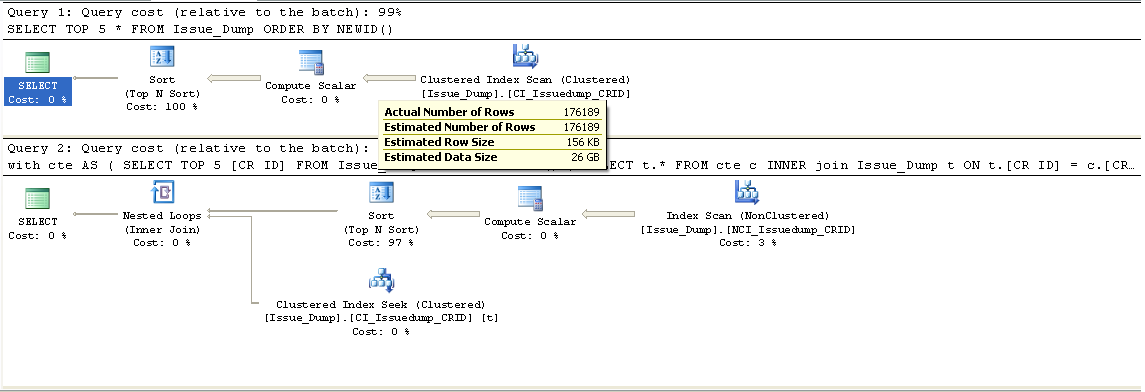
    Look at the Execution Plans of the 2 queries. The CTE query outperforms the non CTE query; the CTE query chooses the Non-Clustered Index Scan(to Retrieve 5 Random OrderIDs) and a Clustered Index seek(To retrieve details of 5 records), while our initial query settled for a Clustered Index Scan.

    Note: After a discussion with Brad, There will be some exceptional cases, which optimizer will choose entire Clustered Index Scan to retrieve the records

    1. When the "Id" column is not covered by index or it is not the first key column in case of index has multiple keycolumns.
    2. When the Random Records Sample size is too large.

    2559 views
    Instapaper

    10 comments

    Comment from: Brad Schulz [Visitor] · http://bradsruminations.blogspot.com
    Brad Schulz Hi Ramireddy...

    I was a little confused that your CTE query had a NonClustered Index SEEK in it. And then I saw that the query you were running had a predicate of WHERE RecordDtTm='09/15/2010'. Perhaps you forgot to take that predicate out when testing.

    If you got rid of that predicate, it would still have to SCAN that index, and then do a lookup into the clustered index (or RID Lookup if it's a heap which is unlikely) to get all the columns.

    For a small table (like Production.Product in AdventureWorks) the CTE query is about twice as fast (because the nonclustered index it SCANs to get the random 5 ProductID's is so tiny).

    But for a large table (like Sales.SalesOrderDetail) they are about the same, but the CTE takes more Reads to accomplish it. That's because the query plan that gets created uses a HASH JOIN, with a nonclustered index getting fully scanned (to get the top 5 random SalesOrderDetailID's) and the clustered index getting fully scanned and they are hash-joined. I guess the optimizer figured that was cheaper than trying to do a nested loops join.

    --Brad
    09/16/10 @ 14:16
    Comment from: Ramireddy [Member] Email
    Ramireddy Brad,

    Thanks a lot for comment.

    Because of lapse of concentration,I added a filter in where clause, So, they became 2 logically different queries. CTE will retrieve only That day's 5 random records and other will retrieve 5 random records from entire table. So CTE version chooses seek. If i remove that condition it will go for scan. I will update that...

    But coming to Sales.SalesOrderDetails table, CTE version choosing Clustered index scan while retrieving details of the 5 records. Because The Clustered key for SalesOrderDetail is combination of SalesOrderId,SalesOrderDetailId, Which forces the clustered index scan. If the Clustered key is only, "SalesOrderDetailId" or If the First Key column of Clusteted Keys is "SalesOrderDetailId" , It will performs the Seek irrespective of tablesize.


    09/17/10 @ 00:31
    Comment from: SQLDenis [Member] Email
    SQLDenis I ran the 2 different versions against a couple of tables of different sizes in my db, here are the results

    Non CTE Version
    statistics IO: Scan count 9, logical reads 11581
    statistics time 1125 ms


    CTE Version
    statistics IO: Scan count 9, logical reads 1382
    statistics time 563 ms


    Non CTE Version
    statistics IO: Scan count 9, logical reads 82877
    statistics time 5007 ms


    CTE Version
    statistics IO: Scan count 9, logical reads 5180
    statistics time 2358 ms


    The CTE version outperformed the non CTE version
    09/17/10 @ 08:17
    Comment from: Erik [Member] Email
    Erik There's something wrong with the row count as given 1,80,000.
    09/17/10 @ 10:19
    Comment from: Brad Schulz [Visitor] · http://bradsruminations.blogspot.com
    Brad Schulz Ramireddy:

    Excellent point about Sales.SalesOrderDetail and its Clustered Index Key... that's exactly what was causing the Hash Join. I should have made the JOIN to the CTE on (SalesOrderID,SalesOrderDetailID)... once I do that, then everything falls into place and you get the Nested Loops Join.

    So the key point is that the CTE must produce the Clustered Index key (not necessarily the Primary Key, which could conceivably be housed in a NONclustered index)... that way the SEEK can be employed to acquire the rest of the columns in the Clustered Index.

    Unfortunately I chose the wrong table for my example... one that doesn't use its identity column as its clustered key.

    So your findings are absolutely spot on... excellent post. Thanks!

    --Brad
    09/17/10 @ 10:29
    Comment from: Ramireddy [Member] Email
    Ramireddy Eric,

    "There's something wrong with the row count as given 1,80,000".

    Can you explain it pls more? If you see the picture, It showed a tooltip, stating that actual no of rows returned are 1,76,189...
    09/17/10 @ 20:19
    Comment from: Christiaan Baes (chrissie1) [Member]
    Christiaan Baes (chrissie1) Rami it should be 180,000 there should not be a comma between the 1 and the 8
    09/18/10 @ 02:07
    Comment from: Ramireddy [Member] Email
    Ramireddy Chrissie,

    We usually follow indian numeric system, where as you mostly will follow western numeric system.
    09/18/10 @ 06:57
    Comment from: Shanky [Member] Email
    Shanky Hi Ramireddy,
    Thanks for your posts. In your example, you have quoted a scenario of having clustered and non-clustered index on the same column but I have read and seen that in case of duplication, the sql server chooses the clustered index.

    My question, is whether it is a good practice to have a clustered and a non-clustered index on the same column?
    09/20/10 @ 05:51
    Comment from: Ramireddy [Member] Email
    Ramireddy SQL Optimizer will works in Cost-based approach. which ever approach, will have less cost, it will follow that approach.
    Choosing The Clustered Index or Non Clustered Index based on the Selectivity of records. The more records u select, the more chances that otimizer will choose for CI.
    I will tell u an example:
    Suppose, an CI is across 5000 pages with 5 Levels
    and an Non-CI is across 500 Pages with 2 Levels
    If u execute my CTE Type of query,
    If you select 10 records,

    if It follows CI approach, it will always reads 5000 Pages...
    If it follows Non-CI approach,it reads 550(500 + 5 * 10) Pages

    So, here optimizer will go for Non-CI

    If you select 100 records, CI approach as usual reads5000 Pages, Non -CI approach reads, 1000(500 + 5 * 100) Pages.

    So, here otimizer mostly will go for Non-CI

    If you select 1000 records, CI approach as usual reads5000 pages, Non-CI takes, Non-CI approach reads, (5500) pages.
    So, here it will choose Clustered Index.


    So, as the no of records increases, the chances more that it will depends on CI only.....


    09/20/10 @ 06:28

    Leave a comment


    Your email address will not be revealed on this site.

    Your URL will be displayed.
    (Line breaks become <br />)
    (Name, email & website)
    (Allow users to contact you through a message form (your email will not be revealed.)