



The question is often asked: when will SQL Server statistics update if auto update stats is enabled?
The short answer: When auto update stats is enabled in a database, statistics will update when 20% + 500 rows have changed in the table. This change can be adding new rows, removing rows or updating rows.
If you attend sessions or read many tuning articles that involve statistics on the internet, you may have seen the statement, “20% + 500 rows” more than a few times. Some related information on when the 20% + 500 does actually come into play and how the cardinality of the table plays a role can be found in KB 195565, “Statistical maintenance functionality (autostats) in SQL Server”.
Specifically a section extracted…
The basic algorithm for auto update statistics is:
- If the cardinality for a table is less than six and the table is in the tempdb database, auto update with every six modifications to the table.
- If the cardinality for a table is greater than 6, but less than or equal to 500, update status every 500 modifications.
- If the cardinality for a table is greater than 500, update statistics when (500 + 20 percent of the table) changes have occurred.
For table variables, cardinality changes does not trigger auto update statistics.
Referenced from – http://support.microsoft.com/kb/195565
The best way to look at this is to give it a try and see if the statement is accurate.
Taking a closer look
Statistics are the lifeline of generating an efficient method for retrieving data by the optimizer. Statistics will base the cost in a form of the estimated amount of data that will be retrieved. This could mean the difference between operations such as physical join operations leading to sorts or inadequate estimation of memory allocation needs. If statistics are outdated or missing, execution plans can be inaccurate and cause severe performance issues.
Since statistics are so critical to cost estimation and plan generation, knowing how and when statistics are updated is just as critical. Of course, this knowledge isn’t just wasted space in the mix of knowing how SQL Server works but gives a person in charge of maintaining a database power to know how to maintain statistics correctly.
Given statistics will be automatically updated when 20% + 500 rows have changed, we can estimate based on the total number of rows or growth expectancy, when statistics may be outdated and cause a potential issue. Imagine a table that has 5000 rows of data in it, and that data changes often. This would indicate 5,000 * .2 + 500 = 1,500 rows would have to change before statistics would be updated. 1,500 rows to 5,000 isn’t truly a great deal of data when the 5,000 is being changed at a high rate. Now, think of a table that has 1,000,000 rows in it. This would equate to 1,000,000 * .2 + 500 = 200,500 rows before statistics will update. 200,500 rows is a much larger number and if it took a long time to reach that, but possibly reaches 190,000 quickly, we potentially have an issue and statistics could be poorly representing the data in the table.
20% + 500
Let’s run an example to see if the 20% + 500 really is accurate. To monitor the update of statistics, extended events will be used. This is also a great way to monitor your systems for auto update stats being heavily performed and potentially a reason to turn off auto update stats.
Setup XEvent “auto_stats”
CREATE EVENT SESSION [AutoStats_Monitor] ON SERVER
ADD EVENT sqlserver.auto_stats(
    ACTION(package0.collect_cpu_cycle_time,package0.collect_current_thread_id,package0.collect_system_time,sqlos.cpu_id,sqlserver.client_hostname,sqlserver.client_pid,sqlserver.database_id,sqlserver.database_name,sqlserver.nt_username,sqlserver.plan_handle,sqlserver.request_id,sqlserver.sql_text,sqlserver.username))
ADD TARGET package0.ring_buffer
WITH (MAX_DISPATCH_LATENCY = 1 SECONDS)
GO
ALTER EVENT SESSION [AutoStats_Monitor] ON SERVER STATE = START
GO
To query the events captured, use the following query
DECLARE @xeventdata XML
SELECT @xeventdata = CAST(target_data AS XML)
FROM sys.dm_xe_sessions AS s
JOIN sys.dm_xe_session_targets AS t
    ON t.event_session_address = s.address
WHERE s.name = 'AutoStats_Monitor'
  AND t.target_name = 'ring_buffer'

SELECT
    @xeventdata.value('(RingBufferTarget/@processingTime)[1]', 'int') AS [Process time],
    @xeventdata.value('(RingBufferTarget/@eventCount)[1]', 'int') AS [Events captured],
    @xeventdata.value('(RingBufferTarget/@memoryUsed)[1]', 'int') AS [Memory used]

To read more about extended Events, look to Jonathan Kehayias’s series on SQLSkills.com.
Set up a test table named statsupdate.
IF EXISTS(SELECT 1 FROM sys.objects WHERE Name = 'statsupdate')
 BEGIN
	DROP TABLE statsupdate
 END
GO
CREATE TABLE statsupdate (ID INT IDENTITY(1,1), Col1 VARCHAR(10))
GO
INSERT INTO statsupdate
SELECT REPLICATE('x',10)
GO 11000
The test table now has 11,000 rows in it. We should be able to determine how many rows would need to change before statistics would automatically update by running the following statement.
Note: when the 20% + 500 row change count is reached, the statistics are flagged to be updated. The actual updating event will occur at the next time a query is issued and the statistics are needed. This is a key piece of information when data is updated often but seldom read
SELECT COUNT(*) *.20 + 500 [When will they update?] FROM statsupdate
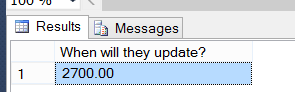
This means that 2,700 rows would need to change before statistics will update. Of course, we do not have any statistics on the table at this point due to there not being a clustered index, nonclustered index or querying the table. To create some statistics to monitor, create the following nonclustered index.
CREATE INDEX IDX_Col1 ON statsupdate (Col1)
INCLUDE (ID)
GO
Viewing the statistics area in Object Explorer in SSMS, we can see the statistics were created.
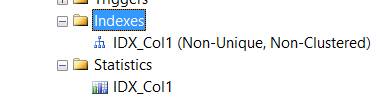
We can also see this by querying the sys.stats catalog view.
SELECT * FROM sys.stats WHERE name = 'IDX_Col1'

Given the following query, the statistics and index IDX_Col1 will be utilized.
SELECT id FROM statsupdate WHERE Col1 = REPLICATE('x',10)
GO
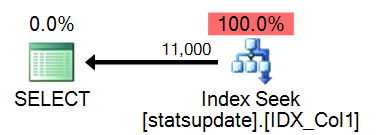

The above screenshot is from the tool Plan Explorer Pro – highly recommended for more effectively tuning and reviewing execution plans in SQL Server
Reviewing the Top Operations in Plan Explorer, we can see that the estimation was accurate based on the statistics generated with the new index.
Next, execute an update to alter 2699 rows in the statsupdate table (1 row under the 2700 count or 20% + 500 to update statistics)
UPDATE statsupdate
	SET col1 = REPLICATE('a',10)
WHERE id <= 2699
As stated earlier, we truly do not know if the statistics were flagged for auto updating until we try to use them. To ensure this happens, run the same query from earlier
SELECT id FROM statsupdate WHERE Col1 = REPLICATE('x',10)
GO
After executing the update, check to see if we captured an auto_stats event

As shown, no auto_stats event was executed. Further investigation shows a cardinality issue in the execution plan that was generated from the query.

At this time we are at a 20% + 499 row changes to the data in the statsupdate table. This would mean that only one more row needs to change in order to flag the statistics for automatic updating.
Execute the following to update one more row.
UPDATE statsupdate
	SET col1 = REPLICATE('a',10)
WHERE id > 2699 AND id <= 2700
Query the table to ensure, if flagged, the statistics will update.
SELECT id FROM statsupdate WHERE Col1 = REPLICATE('x',10)
GO
First, review the execution plan from the above query. Check the estimation verses the actual rows that were returned.

As shown, the estimated and actual are equal in this execution.
Now, check to see if the auto_stats event was indeed captured.

As shown, we absolutely triggered automatically updating of the statistics by reaching the change count of 2700 rows in our test table (20% + 500).
Summary
Statistics are a crucial factor in how SQL Server and the Optimizer comes to an Execution Plan it will use to retrieve data. Knowing how configurations such as autostat and others that directly affect how statistics are updated, stored and what they are composed of, is also a crucial factor so we can maintain them, make better decision on them and troubleshoot them when potential performance issues arise.


