



When setting up and designing a merge replication publication that will utilize join filters, logging levels can be vital to determining design issues in the setup. Logging the synchronizing process quickly identifies points of failure and where to focus efforts to find a solution to the problems causing the failures.
The following publication on AdventureWorks database has a design flaw relating to the article SalesOrderDetail.

This publication has a parameterized filter on Person.Person of SUSER_SNAME() and join filters on SalesOrderHeader and SalesOrderDetail. The partition that will be generated is set to be for only one subscriber.
SalesOrderDetail has a trigger on it named iduSalesOrderDetail. This trigger was not known prior to setting up the publication. When the initial synchronization and snapshot was executed on a subscriber, the publication failed with the following errors for each insert into the subscribers SalesOrderDetail table.
The merge process is retrying a failed operation made to article ‘SalesOrderDetail’ – Reason: ‘The Merge Agent was unable to synchronize the row due to one or more unanticipated errors in the batch of changes. When troubleshooting, increase the -OutputVerboseLevel setting, restart the agent, and check for and resolve any errors generated by the database engine. ‘.
This error is of little assistance in determining the problem with the initial attempt to apply the snapshot. The error does refer the reader to the need to use OutputVerboseLevel setting to log more details on the problem. To do this, using replmerg from a command prompt can be more admin friendly. In order to use replmerg, open a command prompt and change the directly to the COM folder for your version of SQL Server. 90 = SQL Server 2005, 100 = SQL Server 2008 and 2008 R2 and 110 = SQL Server 2012. At a minimum, the replmerg command requires the following options
replmerg.exe -Publisher [ONPNTRC0] -PublisherDB [AdventureWorks] -Publication [SalesBySalesID] -Subscriber [ONPNTRC0] -SubscriberDB [AdventureWorksReplica] -Distributor [ONPNTRC0] -DistributorSecurityMode 1 -SubscriberSecurityMode 1
As the error indicates, we need more verbose logging to determine the cause. To do this, use the –Output and –OutputVerboseLevel options in the command. The OutputVerboseLevel takes three values: 0, 1 and 2. 2 reports the highest level of logging. There are two more undocumented levels: 3 and 4. These offer an even more in-depth level of logging. The higher the level, the more information that is logged and the more this logging will degrade overall performance. It is good to use the lowest levels to determine if they can provide the information needed before logging too much.
-OutputVerboseLevel 4 -Output “C:replmerg2.log”
The complete command
replmerg.exe -Publisher [ONPNTRC0] -PublisherDB [AdventureWorks] -Publication [SalesBySalesID] -Subscriber [ONPNTRC0] -SubscriberDB [AdventureWorksReplica] -Distributor [ONPNTRC0] -DistributorSecurityMode 1 -SubscriberSecurityMode 1 -OutputVerboseLevel 4 -Output "C:replmerg2.log"
This command generates the file C:replmerg2.log. Open the file and review the logs. For the errors that are generated from the example publication, the following was logged after the first SalesOrderDetail operation

The problem with Production.TransationHistory is shown here. The object is not part of replication so it has not been created on the subscriber. Since the trigger in the SalesOrderDetail references it, the error will be thrown on each update transaction. This could be fixed initially by using the NOT FOR REPLICATION option. In fact, this would allow the initial snapshot to apply and complete successfully
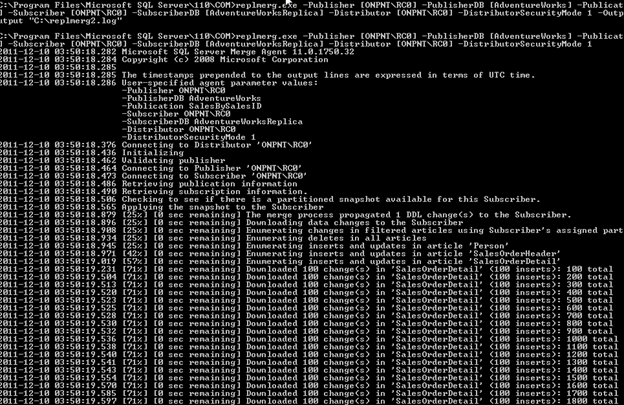
However, that will only prevent replication triggers from firing. The trigger will still be on the subscriber table and when normal update operations occur, the error will be generated on the object invalid reference.

To fix this, the trigger can be altered to check for the table before updating or it can be included in the publication design. In the case of this trigger, we can look to the relationships in the Production.TransactionHistory table. In this case, the ReferenceOrderID can be used to join the table to SalesOrderHeader.
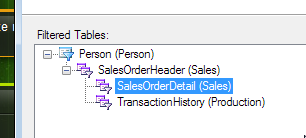
Applying this new filter configuration successfully completes
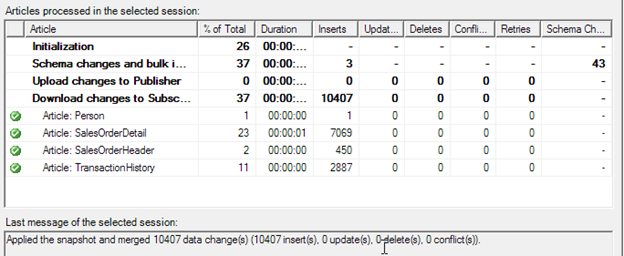
This raises another problem though. When filters and joins become extensive, replication performance can degrade quickly. Be sure to monitor and test the levels of filters and joins you use in the publications. On many occasions, replicating more data without a join is better performing than adding a join. And never forget to tune for the joins themselves just as you would tune any other query.


