



In the previous article, “Estimating Mean Uptime for Team-based uptime measurements” uptime planning was discussed in some detail. The calculation you could use to set team goals was provided. All of these goals in general are for helping gauge how we are doing and where we have growth areas, but how do we even use something like database mirroring with our applications?
In most .NET-driven development, and when a SQL Server database is behind the application, a connection string is involved. In particular, ADO.NET connection strings are commonly used to connect to SQL Server. One thing that the ADO.NET connection string offers an application is the Failover Partner property. The Failover Partner property provides an application or service the ability to automatically decide to look to a secondary source if the primary is unavailable. In conjunction with SQL Server’s database mirroring, this can be very powerful and provide the ability to help us meet our projected uptime goals.
Failover Partner
The Failover Partner property is used with the ADO.NET or SQL Native Client connections. The connection string would be formed as follows.
Data Source=PrincipalServer;Failover Partner=MirrorServer;Initial Catalog=AdventureWorks;Integrated Security=True;
The Failover Partner property is available in SQL Server 2005, 2008, 2008 R2 and, as of this article’s publish date, SQL Server 2012 RC0.
This can be seen in detail on http://www.connectionstrings.com/sql-server-2008.
The Failover Partner property is all that is needed for the connection string to be well-formed to take into account a mirrored SQL Server instance. To see this in action and provide testing on both normal operations and a failover event, we’ll use a .NET Windows Form Application.
The application’s interface consists of a grid view, a button to load the grid view, and an option to show the connection string using the Failover Partner property.
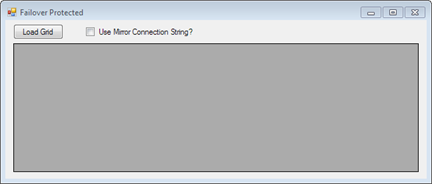
The design of this form allows a connection string with the Failover Partner setting and without. If the “User Mirror Connection String?” check box is checked, the connection string will use the Failover Partner property. The code to determine this is as follows.
string strconn;
            switch (checkUseMirrorString.Checked)
            {
                case true:
                    strconn = @"Data Source=ONPNTRC0;Failover Partner=ONPNTRC0_Mirror;Initial Catalog=AdventureWorks;Integrated Security=True;";
                    break;
                default:
                    strconn = @"Data Source=ONPNTRC0;Initial Catalog=AdventureWorks;Integrated Security=True;";
                    break;
            }
The remaining code in the form handles loading the grid and providing a notification, message box, of the current connection string being used.
SqlConnection conn = new SqlConnection(strconn);
            SqlDataAdapter da = new SqlDataAdapter("select TOP 100 * from Sales.SalesOrderHeader", strconn);
            SqlCommandBuilder cmd = new SqlCommandBuilder(da);
            DataTable dt = new DataTable();

            try
            {
                da.Fill(dt);
                conn.Open();
                Salesgrid.AutoResizeColumns(DataGridViewAutoSizeColumnsMode.AllCellsExceptHeader);
                Salesgrid.ReadOnly = true;
                Salesgrid.DataSource = dt;
            }
            catch (Exception ex)
            {
                MessageBox.Show(ex.Message.ToString());
            }
            finally
            {
                conn.Close();
                dt.Dispose();
                da.Dispose();
            }
This code is not complex and better methods may exist. For demonstration purposes, this code will help us see the Failover Partner usage in action.
The database AdventureWorks has been configured for mirroring to a secondary instance acting as the mirror. If you need help setting up mirroring, refer to, “Mirroring Hands On with Developer Edition”.
There are a few tests to run.
- Normal operations without the Failover Partner
- Test when the principal database is offline and no Failover Partner is used
- Test normal operation with the Failover Partner and the mirror is offline
- Test normal operations with the Failover Partner and the mirror is online
- Test normal operations and the mirrored partnership has failed to the mirrored database
- Test normal operations and the mirrored database has failed back to the principal
The results
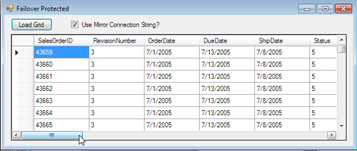
Grid loading successful
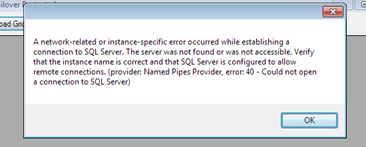
Grid loading failure with connection error
Grid loading successful. SQL connection showing on Principal instance for confirmation
Grid loading successful. SQL connection showing on Principal instance for confirmation
Grid loading successful. SQL connection showing on Mirror instance for confirmation
Grid loading successful. SQL connection showing on Principal instance for confirmation
A last step is performed for mirroring being removed from the principal database. In this test case, the grid successfully loads even with mirroring not being configured on the database. However, taking the database offline does not check for the second instance in this case.

This confirms that the connection string, even with the Failover Partner configured, is database mirroring aware. If the mirror is not configured, even with the Failover Partner set, the connection will persist to look to the primary data source.
Results and Conclusions
The Failover Partner configuration in an ADO.NET or SQL Native Client connection can be invaluable when Database Mirroring is configured. The tests run in this article show that the connection is stable on several events that are present in the mirroring partnership and also exposes what happens if that partnership is broken. Keep this in mind if taking your mirror configuration down for any reason. It is more reliable to use the Pause Mirror commands when the need for maintenance on a mirroring session is needed. You can read more about pausing database mirroring in this article, “Stop Mirroring for server reboot”.
Even if you have an application in development, design, or an existing application, requesting this change to a connection string is a critical planning step. If the application in question is external and database mirroring is configured locally, contact the vendor to request a change to their connection string, or request the steps that you and the vendor may take to work together to add the functionality. In most cases, the vendor will work with you and even put this option into their applications and systems as a beneficial option to other customers.


