



Merge Replication: Snapshot Performance with Data Partitions
This week is SQL University Performance week. Grant Fritchey (Blog | Twitter) and myself are on point (get it?). There are many things we could talk about when it comes to improving performance for SQL Server. As most of the SQL world knows, Grant is one part human and three parts Optimizer. There are only a few people I know of that have the knowledge of everything that goes into the life cycle of a transaction. With that, Grant’s part of the week and that side of performance will be well covered and handled.
My goal this week was to bring to everyone something that I thought was overlooked: Merge Replication and Applying Snapshots.
There are a few things that are important in merge replication when performance comes to mind. Filters and tuning the database to handle those filters, snapshot tuning switches such as the MaxBCPThreads switch, active connections, synchronizing boosts with more switches all the way down to network performance with replication. We’re going to focus on one of those that are overlooked. If overlooked, this topic can also cause much grief and cause merge replication to be the thorn in your administration tasks each day.
Geographically distant pull subscribers on parameterized filter publications
Today we are going to talk about the snapshot process when you are replicating over a vast geographical distance. The problem that needs to be solved with this situation revolves around connectivity. If connectivity was at blazing speeds all the time, there really wouldn’t be a problem. Or would there? If a publication is large, your initialization times will be lengthy. During that time you would be taking resources from SQL Server and the articles that are in the snapshot generated from the publication. Those resources would be in contention with normal operations and other replicating subscribers.
Replication has built in compression for snapshots. This is a mechanism that will run a snapshot and then compress it. Then the subscriber can download the compressed version of the snapshot, uncompressing and apply it. Sounds like a perfect solution to free network connectivity and contention issues. The problem with using the compression option in replication is that you are limited to 2 GB in size and, more importantly, compression utilizes one resource extensively: CPU. Since compression utilizes so much CPU (based completely on the hardware at hand on how much) using it as a solution can be a problem in itself. With these considerations and limitations, the solution almost seems unusable.
Why don’t we reinvent the wheel but remove some of the cons that the wheel initially introduced into the situation?
Reinventing the Wheel of Compression for Snapshots
There are a few things we need to solve before designing our own compressed snapshot availability service.
- Offload compression and resource usage to another server
- File storage
- Subscriber needs to know how to use and apply the snapshot
The three tasks bring us to a diagram shown in the figure below.
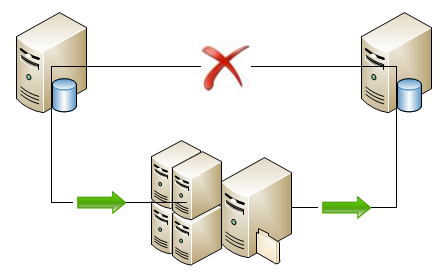
The red X through the typical direct connection is what we want to avoid. The green arrows represent the snapshot process that flows to another server used to offload the work of compressing the snapshots and then flows to the subscriber.
In this situation we are tasked with a Pull subscription drawing from a publication using parameterized filters. With a pull subscription we have the ability to make some decisions on the subscriber side for where the snapshot files are located and used to initialize or re-initialize the subscription. The choices are: Alternate and Dynamic location (as well as Default and FTP).
- Alternate Folder is a folder that is set on the publication different from the default folders that snapshots are typically loaded to. This can be useful for using shares and other options such as putting snapshots on DVD and physically sending the snapshot to offsite locations
- Dynamic Folders are similar to Alternate Folders but differ in they are used when parameterized filters are used in the publication. With both we can set them to a local folder on the client.
Establishing the needs, we are looking at utilizing Dynamic Folder settings for the solution of where to pull the snapshot from. Why not use the local client when at all possible.
Data Partitions
In the situation we’ll cover, the partition that is created will be for an SUSER_NAME. A data partition is created upon synchronizing or by manually adding the SUSER_NAME (or HOST_NAME) to the publication. This is a unique value that is used to run a specific snapshot based on only the rows that belong to value.
Design Workflow
The flow of our design will incorporate SQL Server Integration Services to handle the entire monitoring and compressing of the partitioned snapshots. This SSIS package will directly interact with several merge replication procedures already available to determine the state of the partitions and subscribers.
The design flow that we will achieve
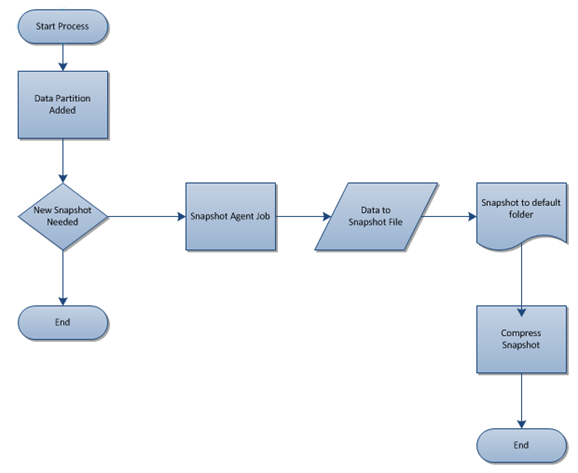
Adding a partition can be a manual process, upon first time synchronizing or be done programmatically. This will depend on the business process and standard operating procedures. In T-SQL we can use sp_addmergepartition to accomplish this or, from C#, the AddMergePartition method.
Pseudo Coding
The “New Snapshot Needed” decision will be based off an internal decision coded as follows, with each distinct replication procedure listed beside it that is required.
- Enumerate the publication – sp_helpmergepublication @publication_name
- Extract the retention period – retention column returned from sp_helpmergepublication
- Enumerate all partitions – sp_helpmergepartition @publication_name
- For each partition, decide if the last refresh date minus the retention period is in the past – sp_helpmergepartition @publication_name, @suser_sname
- If the date calculation is in the past, execute the agent job to run a snapshot
- Once the agent job is done, compress the folder and move to another location available to subscribers
This pseudo coded flow is the first step in development. With the flow chart above and the written process, SSIS falls together very well. This provides a quick development timeline and a quicker implementation.
Next Step
The next step is to start writing the SSIS package that will run and handle this entire process. This will be done in the second part of this week. Think about the design and flow of this process until then. How would you do it? Would you use a windows service to handle the entire process?
If you are reading this as a student of SQL University; I’d like to hear those answers and discussion thread here in the comments area.


