



I once had a boss whose desk looked something like this:

Shudder. I like things organized, from the files on my desk to the files in my database. There’s a mechanism in SQL Server to help you separate and organize files: filegroups.
What is a Filegroup?
A filegroup is a logical structure to group objects in a database. Don’t confuse filegroups with actual files (.mdf, .ddf, .ndf, .ldf, etc.). You can have multiple filegroups per database. One filegroup will be the primary, and all system tables are stored on it. Then, you add additional filegroups. You can specify one filegroup as the default, and objects not specifically assigned to a filegroup will exist in the default. In a filegroup, you can have multiple files.
![][1]
Only data files can be assigned to filegroups. Log space is managed separately from data space.
Why Should I Create Multiple Filegroups?
There are two primary reasons for creating filegroups: performance and recovery.
Filegroups that contain files created on specific disks can alleviate disk performance issues. For example, you may have one very large table in your database with a lot of read and write activity – an orders table, perhaps. You can create a filegroup, create a file in the filegroup, and then move a table to the filegroup by moving the clustered index. (I’ll cover how to do this later in this post.) If the file is created on a disk separate from other files, you are going to have better performance. This is similar to the logic behind separating data and log files in a database. Performance improves when you spread files across multiple disks because you have multiple heads reading and writing, rather than one doing all the work.
Filegroups can be backed up and restored separately as well. This can enable faster object recovery in the case of a disaster. It can also help the administration of large databases.
How Do I Create Multiple Filegroups?
If you are creating a new database, you can specify the filegroups in the CREATE DATABASE statement.
Here, I will create a database named FilegroupTest. It has two filegroups, PRIMARY and FGTestFG2. There are two data files, FGTest1_dat, assigned to PRIMARY; and FGTest2_dat, assigned to FGTestFG2.
CREATE DATABASE FilegroupTest
ON PRIMARY
(NAME = FGTest1_dat,
 FILENAME = 'C:Program FilesMicrosoft SQL ServerMSSQL10_50.MSSQLSERVERMSSQLDATAFGTest1_dat.mdf'),
FILEGROUP FGTestFG2
(NAME = FGTest2_dat,
 FILENAME = 'C:Program FilesMicrosoft SQL ServerMSSQL10_50.MSSQLSERVERMSSQLDATAFGTest2_dat.mdf')
LOG ON
(NAME = FGTest_log,
 FILENAME = 'C:Program FilesMicrosoft SQL ServerMSSQL10_50.MSSQLSERVERMSSQLDATAFGTest_log.ldf')
If you have an existing database, use can use the ALTER DATABASE statement to add a filegroup. I’m going to add FGTestFG3 to FilegroupTest.
ALTER DATABASE FilegroupTest
ADD FILEGROUP FGTestFG3
I can view the filegroups in a database using sys.filegroups.
USE FilegroupTest;
GO
SELECT *
FROM sys.filegroups

To create a new file, FGTest3_dat, and assign it to FGTestFG3, I’ll use ALTER DATABASE again.
ALTER DATABASE FilegroupTest
ADD FILE
(NAME = FGTest3_dat,
 FILENAME = 'C:Program FilesMicrosoft SQL ServerMSSQL10_50.MSSQLSERVERMSSQLDATAFGTest3_dat.mdf')
TO FILEGROUP FGTestFG3
Right now, my PRIMARY filegroup is the default filegroup. I can change that to FGTestFG3 using ALTER DATABASE.
ALTER DATABASE FilegroupTest
MODIFY FILEGROUP FGTestFG3 DEFAULT
When I re-run my sys.filegroups query, is_default value has changed.

How Do I Move An Object to a Different Filegroup?
You can move a table from one filegroup to another, provided the table has a clustered index on it.
Note: You can move a heap (a table with no clustered index). To do so, you would create an index, move it, and drop the index.
First, I create a table with no indexes.
CREATE TABLE StuffAndJunk
(StuffHere INT NOT NULL,
 JunkHere INT NOT NULL)
I can use sp_help to see which filegroup this was created on. It was created on the default, FGTestFG3.
exec sp_help 'dbo.StuffAndJunk'
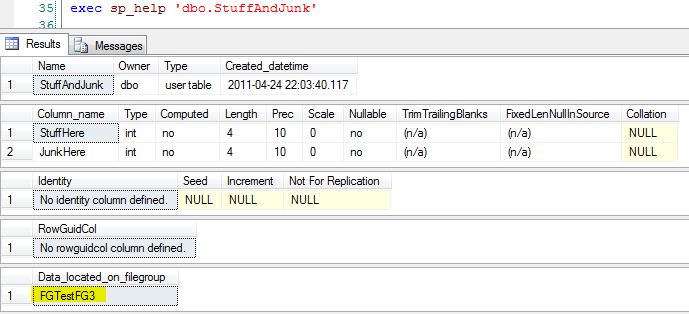
I can also return this information using the sys.filegroups, sys.allocation_units and sys.partitions tables.
SELECT PA.object_id, FG.name
FROM sys.filegroups FG
	INNER JOIN sys.allocation_units AU ON AU.data_space_id = FG.data_space_id
	INNER JOIN sys.partitions PA ON PA.partition_id = AU.container_id
WHERE PA.object_id =
	(SELECT object_id(N'FilegroupTest.dbo.StuffAndJunk'))
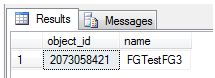
I cannot move the table only. That is simply not part of the ALTER TABLE syntax. According to BOL, MOVE TO “Specifies a location to move the data rows currently in the leaf level of the clustered index.”
Note: It is possible to create a table in a secondary filegroup, move the data from the first filegroup to the second, and then drop the table from the primary. Be aware that these types of operations cause a high level of transaction log entries. Ensure that the transaction log is properly sized to prevent a large amount of growth in the logs or inadvertently affect things that rely on the transaction logs such as log shipping or mirroring.
I’m going to add a clustered index to the table. When I do this, I specify which filegroup I want it created on. I create StuffJunk on FGTestFG2.
CREATE CLUSTERED INDEX StuffJunk
	ON StuffAndJunk (StuffHere, JunkHere)
	ON FGTestFG2
If I run my sys.filegroups query again, I can see I have the same object_id, but it has moved to a different filegroup.

How would I move a table with an existing clustered index? Let’s move StuffAndJunk back to FGTestFG3. I would issue a create clustered index command with the option to drop existing, like this.
CREATE CLUSTERED INDEX StuffJunk
	ON StuffAndJunk (StuffHere, JunkHere)
	WITH (DROP_EXISTING = ON)
	ON FGTestFG3
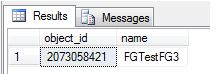
Re-running my sys.filegroups query shows that the index, and thus the data and table, are on FGTestFG3.
Organize, Organize, Organize!
Help your databases look like this:
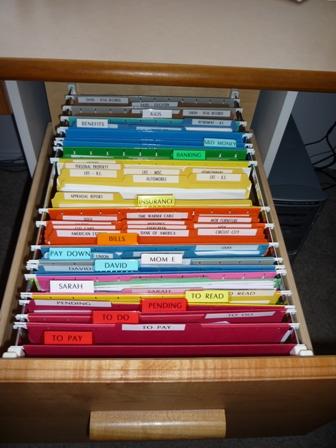
Filegroups are a great way to organize your data, increasing performance and providing additional disaster recovery. If you can do this in the planning stages, it’s great, but be aware that you can add filegroups in later, too.
[1]: /wp-content/uploads/users/grrlgeek/Filegroup.jpg?mtime=1303779237 “”
 Jes Borland is a Premier Field Engineer - SQL Server for Microsoft, where she is a trusted technical adviser, deep technical support, and teacher for her customers. Her experience as a DBA, consultant, and 5-time Data Platform MVP allow her to help the business and the IT teams reach their goals. She has worked with SQL Server as a developer, report writer, DBA, and consultant. Her favorite topics are administration, automation, and performance. She frequently presents at user groups, SQL Saturdays, and other community events. She is also an avid runner and chef.

