



So far in the SQL Server Audit series we’ve looked at the different components that make up the auditing feature as well as how to create the audits with specifications specific to databases as well as server level.
Here is the links to the posts covering the topics:
SQL Server Auditing: Introduction
SQL Server Auditing: Creating a Server Specification
SQL Server Auditing: Creating a Database Specification
Now that we have set up our audits covering failed logins on instance level and deletes on database level, let’s take a look at how we can see what audits are on a server as well as some views to make your life easier with reading the audit files.
DMV’s and Views
First off, let’s see what views are available at our disposal:
USE master;
GO
SELECT name,[object_id] FROM [sys].[all_objects]
WHERE TYPE = 'v' AND NAME LIKE '%audit%';
GO
This returns the following for us:
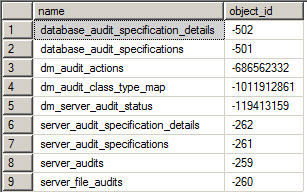
DMV’s
So what does the audit DMV’s do? Let’s take a look:
sys.dm_audit_actions
This DMV contains friendlier names, as well as all the actions as well as which action groups they belong to across database and server level specifications.
sys.dm_audit_class_type_map
This contains all the audit classes and action groups available.
_sys.dm_server_auditstatus
This takes a specific look at the audits defined on the server and returns info such as what audits are enabled, statuses for the audits, event times, etc.
_Sys.dm_audit_class_type_map and sys.dm_audit_actions are especially useful to join with the other views to get a more easily readable report on the audits, or to join it with the fn_get_auditfile function when reading audit files.
Server Views
The server views are split up into two “sections”, one for the audits, and the second for the server specification details.
Audits:
_sys.serveraudits
sys.server_file_audits
These views contain details about the server level audits defined on the server, This returns information such as audit names, file names and paths, audit id’s, statuses, etc.
Specification:
sys.server_audit_specification_details
sys.server_audit_specifications
These views are very helpful when you have multiple audits on a server, and matching the various defined audit actions as well as their groups to audits.
Database Views
The database views available are almost identical to the server level ones, except the fact that it’s specific to databases, and that there are no “audit” views; only for database specifications. Another thing to note is, that these views won’t return information across databases on an instance, this needs to be executed per database.
_sys.database_audit_specificationdetails
sys.database_audit_specifications
The views return the specification names, enabled audit actions, audit results, etc.
Now that we’ve got the views covered, a question still lingers… “How do we manage audits across multiple servers?” Well the answer is quite simple, we make use of another new feature introduced in SQL Server 2008 which is Policy Based Management, otherwise known as PBM.
So PBM is a subject on it’s own, so I will not go in depth into this topic.
A key resource required for monitoring your environment is the Enterprise Policy Framework.
Below is a test policy I created for the post and will monitor the audits for the following:
Maximum File Size
On Failure Action
Reserve Disk Space
Maximum Rollover Files
Maximum File Size Unit ( MB, GB or TB )
-- Creates the policy condition

Declare @condition_id int
EXEC msdb.dbo.sp_syspolicy_add_condition @name=N'Audit_Policy_Con', @description=N'', @facet=N'Audit', @expression=N'<Operator>
  <TypeClass>Bool</TypeClass>
  <OpType>AND</OpType>
  <Count>2</Count>
  <Operator>
    <TypeClass>Bool</TypeClass>
    <OpType>AND</OpType>
    <Count>2</Count>
    <Operator>
      <TypeClass>Bool</TypeClass>
      <OpType>AND</OpType>
      <Count>2</Count>
      <Operator>
        <TypeClass>Bool</TypeClass>
        <OpType>AND</OpType>
        <Count>2</Count>
        <Operator>
          <TypeClass>Bool</TypeClass>
          <OpType>EQ</OpType>
          <Count>2</Count>
          <Attribute>
            <TypeClass>Numeric</TypeClass>
            <Name>MaximumFileSize</Name>
          </Attribute>
          <Constant>
            <TypeClass>Numeric</TypeClass>
            <ObjType>System.Double</ObjType>
            <Value>100</Value>
          </Constant>
        </Operator>
        <Operator>
          <TypeClass>Bool</TypeClass>
          <OpType>EQ</OpType>
          <Count>2</Count>
          <Attribute>
            <TypeClass>Numeric</TypeClass>
            <Name>OnFailure</Name>
          </Attribute>
          <Function>
            <TypeClass>Numeric</TypeClass>
            <FunctionType>Enum</FunctionType>
            <ReturnType>Numeric</ReturnType>
            <Count>2</Count>
            <Constant>
              <TypeClass>String</TypeClass>
              <ObjType>System.String</ObjType>
              <Value>Microsoft.SqlServer.Management.Smo.OnFailureAction</Value>
            </Constant>
            <Constant>
              <TypeClass>String</TypeClass>
              <ObjType>System.String</ObjType>
              <Value>Continue</Value>
            </Constant>
          </Function>
        </Operator>
      </Operator>
      <Operator>
        <TypeClass>Bool</TypeClass>
        <OpType>EQ</OpType>
        <Count>2</Count>
        <Attribute>
          <TypeClass>Bool</TypeClass>
          <Name>ReserveDiskSpace</Name>
        </Attribute>
        <Function>
          <TypeClass>Bool</TypeClass>
          <FunctionType>False</FunctionType>
          <ReturnType>Bool</ReturnType>
          <Count>0</Count>
        </Function>
      </Operator>
    </Operator>
    <Operator>
      <TypeClass>Bool</TypeClass>
      <OpType>EQ</OpType>
      <Count>2</Count>
      <Attribute>
        <TypeClass>Numeric</TypeClass>
        <Name>MaximumRolloverFiles</Name>
      </Attribute>
      <Constant>
        <TypeClass>Numeric</TypeClass>
        <ObjType>System.Double</ObjType>
        <Value>100</Value>
      </Constant>
    </Operator>
  </Operator>
  <Operator>
    <TypeClass>Bool</TypeClass>
    <OpType>EQ</OpType>
    <Count>2</Count>
    <Attribute>
      <TypeClass>Numeric</TypeClass>
      <Name>MaximumFileSizeUnit</Name>
    </Attribute>
    <Function>
      <TypeClass>Numeric</TypeClass>
      <FunctionType>Enum</FunctionType>
      <ReturnType>Numeric</ReturnType>
      <Count>2</Count>
      <Constant>
        <TypeClass>String</TypeClass>
        <ObjType>System.String</ObjType>
        <Value>Microsoft.SqlServer.Management.Smo.AuditFileSizeUnit</Value>
      </Constant>
      <Constant>
        <TypeClass>String</TypeClass>
        <ObjType>System.String</ObjType>
        <Value>Mb</Value>
      </Constant>
    </Function>
  </Operator>
</Operator>', @is_name_condition=0, @obj_name=N'', @condition_id=@condition_id OUTPUT
Select @condition_id

GO

-- Creates the Policy

Declare @object_set_id int
EXEC msdb.dbo.sp_syspolicy_add_object_set @object_set_name=N'Audit_Policy_ObjectSet', @facet=N'Audit', @object_set_id=@object_set_id OUTPUT
Select @object_set_id

Declare @target_set_id int
EXEC msdb.dbo.sp_syspolicy_add_target_set @object_set_name=N'Audit_Policy_ObjectSet', @type_skeleton=N'Server/Audit', @type=N'AUDIT', @enabled=True, @target_set_id=@target_set_id OUTPUT
Select @target_set_id

EXEC msdb.dbo.sp_syspolicy_add_target_set_level @target_set_id=@target_set_id, @type_skeleton=N'Server/Audit', @level_name=N'Audit', @condition_name=N'', @target_set_level_id=0
GO

Declare @policy_id int
EXEC msdb.dbo.sp_syspolicy_add_policy @name=N'Audit_Policy', @condition_name=N'Audit_Policy_Con', @policy_category=N'', @description=N'', @help_text=N'', @help_link=N'', @schedule_uid=N'00000000-0000-0000-0000-000000000000', @execution_mode=0, @is_enabled=False, @policy_id=@policy_id OUTPUT, @root_condition_name=N'', @object_set=N'Audit_Policy_ObjectSet'
Select @policy_id
GO
This is just a basic policy using the “audit” facet. There are additional facets for Database Audit Specifications as well as Server Audit Specifications.
Additionally if you decide to use the Enterprise Policy Framework, it should be noted that you need an additional condition to be set up on the policy that will only evaluate the policy against SQL Server 2008+.
Last Thoughts
These are the views we can use to discover what audits are running across an instance or databases, which actions we are auditing for and a brief policy we can use when we have to manage the audit files specifically to ensure we have a set standard.

