



I was running some tests on compression for row and page level, and noticed something interesting. All tables that contained a uniqueidentifier column actually resulted in compressing sample sizes larger than the uncompressed size on the respected indexes that contained the uniqueidentifier. This made sense given the precision of a uniqueidentifier but wanted to test that and also make sure it was in writing before stating the fact.
Estimate Compression ROW and PAGE level
To return a sampling of the compression result, use the procedure sp_estimate_data_compression_savings. The procedure is very useful but it is an “estimation” tool.
To run a test, create the following table and then execute the estimation procedure on both samplings for ROW and PAGE level compression.
create table compress_test (id uniqueidentifier default newid())
go
insert into compress_test default values;
go 10000
EXEC sp_estimate_data_compression_savings 'dbo', 'compress_test', NULL, NULL, 'PAGE' ;
GO
With compressing a table with one column, the results would be thought to compress greatly. In this case they do not though.

Hold on…let’s talk
Before going over the results, note: compression will vary slightly based on the data types that are in the table. There are many data types that cannot be compressed and some that can be greatly impacted by enabling either ROW or PAGE. In most cases, ROW and PAGE level compression will also have drastic differences. A perfect example of a high impact compression can make is on CHAR data types. The benefit of the compression on CHAR is the removal of the trailing space.
Compression may sound like a great thing and in some cases, it is. There are test cases that should be taken before actually enabling compression at the ROW or PAGE level though. Compression increases CPU utilization as the most negatively impacted resource. The trade-off in I/O performance in cases can greatly outweigh that CPU increase.
Back to the uniqueidentifier; Books Online has a table that says exactly the cost savings of data types with compression. In the listing, uniqueidentifier is listed with no effect from compression. This was acceptable based on the case that other data types in the table may benefit greatly still.
After looking into these results, the Books Online article that describes the procedures for estimating compression rates had the answer.
If the results of running sp_estimate_data_compression_savings indicate that the table will grow, this means that many rows in the table use almost the whole precision of the data types, and the addition of the small overhead needed for the compressed format is more than the savings from compression. In this rare case, do not enable compression.
With uniqueidentifier data types, this is the case. Compression at this stage will take more to perform.
This doesn’t mean NOT to enable compression by default because you see a uniqueidentifier column in a table. In fact, let’s test the next script.
create table compress_test_char (id uniqueidentifier default newid(), CHAR_COL CHAR(8000) default 'Take all this space, plus some')
go
insert into compress_test_char default values;
go 10000

EXEC sp_estimate_data_compression_savings 'dbo', 'compress_test_char', NULL, NULL, 'PAGE' ;
GO
This table benefits extremely well from using PAGE compression.
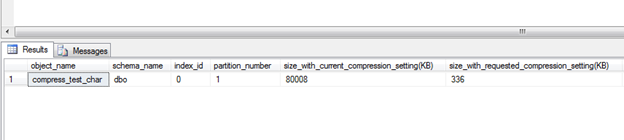
This reason for this is the effects from the CHAR data type and the padding removal.
Double Check Before Enabling
As stated before, each table’s results will be unique when the estimation is complete. The data types in them will cause them to fail or succeed on being benefiting from compression. A combination of data types that benefit from compression and those that don’t will make or break the case.
A perfect example to leave you with is the Sales.SalesOrderDetail table in AdventureWorks. I searched AW to find a table with a combination of data types that probably would not be beneficial from enabling compression. SalesOrderDetail was such a case just on the fence.
EXEC sp_estimate_data_compression_savings 'Sales', 'SalesOrderDetail', NULL, NULL, 'PAGE' ;
GO

We can see the true impact is on the first index but there is a loss on the second index. Looking into the second index it is shown as the AK_SalesOrderDetail_rowguid index. This index is the uniqueidentfier in the table. Of course, the compression of the primary key and the slightcompression of the product ID index accumulate to savings still. That was the why the “fence” statement earlier.
Make sure you test your compression estimated results before enabling it on your tables. You may actually hurt yourself if certain data types are in the table and there are no true benefiting data types existing.
Resources
sp_estimate_data_compression_savings
Creating Compressed Tables and Indexes


