



I went to a local MS launch event for Visual Studio today, mainly to see what was new with Team Foundation Server, but what really impressed me was some of the new architecture tools they’ve added. I admittedly haven’t read too much about this before today (my needs have been well-served by NDepend) but I’m happy to see some improved architecture tools find their way into Visual Studio. Looking at the version comparison chart, it appears this is only available in the Ultimate version.
For this example, I’ll use a Layer Diagram for an imaginary application with Web, Business and Data tiers, and some shared model objects. This is an intentionally oversimplified example.
Anyway here’s what the diagram looks like:
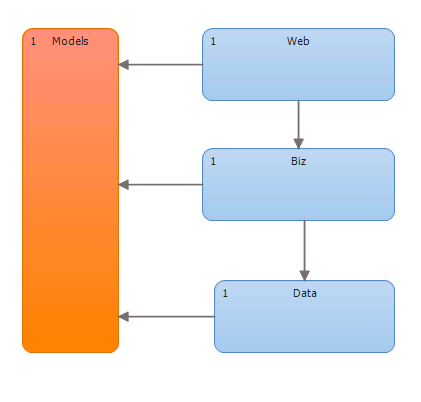
Nothing really special here – the words are the name of the tier, and the numbers are the number of units of code (in this case projects, but you can add individual namespaces or classes as well). To create the diagram, we need to first create a new Visual Studio Modeling Project. A new layer diagram can then be added to this project. I used the designer to add the shapes and dependency lines, and all looks good. But we want to do more than look at it!
This is where things get interesting. To place modules into one of the tiers, you can drag and drop either from the Solution Explorer or from the new Architecture Explorer. Both have different ways of finding the objects you are looking for, but the result is the same. Once all modules are allocated to the right layer, you can right click the diagram and choose “Validate Architecture”.
Visual Studio will then build your solution and validate its architecture. If all goes well, you’ll see something like this in the output window:
1/28/2010 4:04:17 PM: Architecture validation is starting.
1/28/2010 4:04:23 PM: Architecture validation succeeded (0 suppressed).
Now, let’s try adding an illegal call, in this case from the data tier to a caching provider found in the web tier (I first tried adding a reference to the “Biz” project, but was not allowed because it would introduce a cyclic dependency – I guess this was in previous versions but I never ran into it before – pretty cool).
After this call is added, try validating the architecture again. The solution will be rebuilt, and you’ll see something like this:
1/28/2010 4:19:46 PM: Architecture validation is starting.
1/28/2010 4:19:55 PM: Architecture validation failed with 3 violation(s) (0 suppressed).
Ok, so we have violations, just as expected. Clicking over to the error list you can find what exactly the errors are.
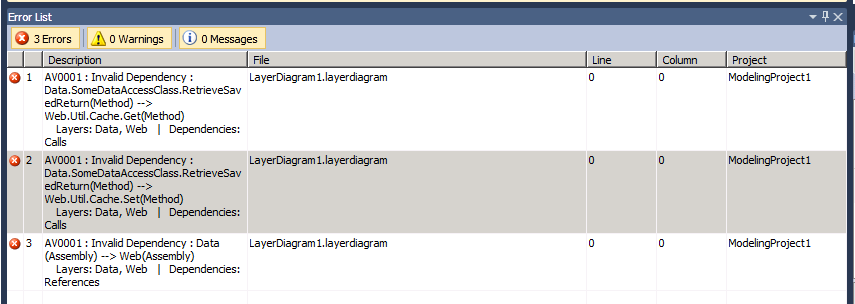
So, not only do the undesirable calls added to the Data Layer’s code trigger violations, but the reference itself does as well. There are a few things of interest that we can do with the errors from here.
When right clicking the error, you can choose “Manage Validation Errors” from the context menu, and then “Suppress Errors”. Well, as long as you’re willing to do it at your own risk ;). Then you’d end up with a build output like this:
1/28/2010 4:25:03 PM: Architecture validation is starting.
1/28/2010 4:25:09 PM: Architecture validation succeeded (3 suppressed).
Knowing our readership, I doubt this will be an option though. So what can be done about this? If you want to fix the error immediately, you can double click the error message and be taken to the offending code, just as you would for a syntax error if a normal build failed. If you use Team Foundation Server, you can also select “Create Work Item” to create a new TFS work item based on the error.
This can also be included as part of your local build process by setting the “Validate Architecture” property of the Modeling Project. TFS users can also add this step to their team build by opening the Compilation tab and adding the following to the MSBuild arguments section:
/p:ValidateArchitecture=true
Adding this to the team build is especially cool, because you can actually block check-ins that introduce these kinds of architectural problems.
I am really excited to see this kind of stuff getting more attention in Visual Studio. I’m not sure if these new components will be able to do everything I’ve come to expect (and love) from NDepend, but their presence is a huge step forward for Visual Studio, and I think for the .net community in general. I’m a big believer in the use of static code analysis as a tool for better understanding the code we work with, and I think that making these tools available to more developers (especially those in shops that are reluctant to use non-Microsoft components or tooling) will really help us continue to improve as a group.
I noticed while writing this post that the latest beta of NDepend 3 is now fully integrated with Visual Studio. I’d meant to do a future post comparing the DGQL queries available in Visual Studio 2010 with NDepend’s CQL, but perhaps a more thorough comparison will be in order.
 Alex is a software engineer from southeastern PA, where he lives with a lovely wife and a veritable smorgasbord of pets. He loves mountain biking, open source software, barbecue and Syracuse basketball.

